cancel
Showing results for 
Search instead for 
Did you mean: 

The Power BI Data Visualization World Championships is back! It's time to submit your entry. Live now!

Reply
Anonymous
Not applicable

Conditional formatting in cluster column chart.

Hello Everyone,

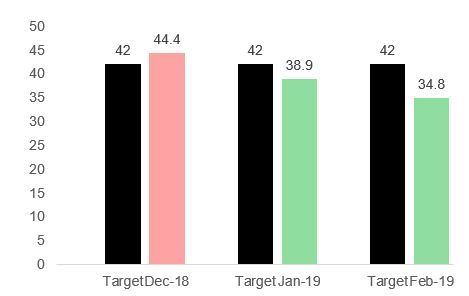
I have a clustered column chart, with 2 data set. One is target and other is value.

If the value goes above the target then the color of that bar chart must change to red, if not than green. (Refer attached screenshot).

If there any ways to achieve this in power BI?

Appreciate your support.


Regards,

SaadExample Graph.JPG

1 ACCEPTED SOLUTION
Anonymous
Not applicable

Hi @Anonymous ,

AFAIK, conditional formatting feature current only works on table and matrix visual. Maybe you can refer to following link to use advanced color control to use formula to conditional your data color:

Data Colors Advanced Controls, November 2018 release

Regards,

Xiaoxin Sheng

View solution in original post

2 REPLIES 2
Anonymous
Not applicable

Hi @Anonymous ,

AFAIK, conditional formatting feature current only works on table and matrix visual. Maybe you can refer to following link to use advanced color control to use formula to conditional your data color:

Data Colors Advanced Controls, November 2018 release

Regards,

Xiaoxin Sheng

Anonymous
Not applicable

Thanks i will go through that info

Helpful resources

Announcements
Power BI DataViz World Championships

Power BI Dataviz World Championships

The Power BI Data Visualization World Championships is back! It's time to submit your entry.

January Power BI Update Carousel

Power BI Monthly Update - January 2026

Check out the January 2026 Power BI update to learn about new features.

FabCon Atlanta 2026 carousel

FabCon Atlanta 2026

Join us at FabCon Atlanta, March 16-20, for the ultimate Fabric, Power BI, AI and SQL community-led event. Save $200 with code FABCOMM.