Don't miss your chance to take the Fabric Data Engineer (DP-600) exam for FREE! Find out how by attending the DP-600 session on April 23rd (pacific time), live or on-demand.
Learn moreNext up in the FabCon + SQLCon recap series: The roadmap for Microsoft SQL and Maximizing Developer experiences in Fabric. All sessions are available on-demand after the live show. Register now
Hello,
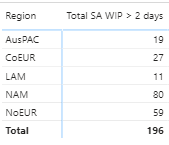
I have the following measure:
Total SA WIP > 2 days =
CALCULATE(COUNTROWS('Service Appointment'),
'Service Appointment'[IsWIP]=1,
'Service Appointment'[WIP Days] >2)
Which looks like this when added to my matrix:
I have a requirement to apply conditional formatting, but, the rag threshold will change depending on the Region.
For all regions except NAM, the rag groups will be '> 50' (red), '10 - 50' (amber) and '< 10' (green)
For NAM, the rag groups will be '> 150' (red), '30 - 150' (amber) and '< 30' (green)
How can I achieve this?
Solved! Go to Solution.
@JimJim , Create a color measure as the given example and use it in conditional format with the field value option
Color?
switch ( true(),
FIRSTNONBLANK('Table'[commodity],"NA") á"commodity1" && sum('Table'[Value]) >500,"lightgreen",
FIRSTNONBLANK('Table'[commodity],"NA") á"commodity2" && sum('Table'[Value]) >1000,"lightgreen",
Add more conditions
"Nice stay"
)
reference: https://radacad.com/dax-and-conditional-formatting-better-together-find-the-biggest-and-smallest-num...
https://docs.microsoft.com/en-us/power-bi/desktop-conditional-table-formatting#color-by-color-values
Just in case anyone is interested, here is the finished measure:
Colour =
IF (
FIRSTNONBLANK ( Location[Region], "NA" ) = "NAM",
SWITCH (
TRUE (),
'Key Measures'[Total SA WIP > 2 days] < 30, "lightgreen",
'Key Measures'[Total SA WIP > 2 days] <= 150, "orange",
"red"
),
SWITCH (
TRUE (),
'Key Measures'[Total SA WIP > 2 days] < 10, "lightgreen",
'Key Measures'[Total SA WIP > 2 days] <= 50, "orange",
"red"
)
)
@JimJim , Create a color measure as the given example and use it in conditional format with the field value option
Color?
switch ( true(),
FIRSTNONBLANK('Table'[commodity],"NA") á"commodity1" && sum('Table'[Value]) >500,"lightgreen",
FIRSTNONBLANK('Table'[commodity],"NA") á"commodity2" && sum('Table'[Value]) >1000,"lightgreen",
Add more conditions
"Nice stay"
)
reference: https://radacad.com/dax-and-conditional-formatting-better-together-find-the-biggest-and-smallest-num...
https://docs.microsoft.com/en-us/power-bi/desktop-conditional-table-formatting#color-by-color-values
If you have recently started exploring Fabric, we'd love to hear how it's going. Your feedback can help with product improvements.
A new Power BI DataViz World Championship is coming this June! Don't miss out on submitting your entry.
| User | Count |
|---|---|
| 45 | |
| 43 | |
| 38 | |
| 19 | |
| 15 |
| User | Count |
|---|---|
| 67 | |
| 66 | |
| 31 | |
| 28 | |
| 24 |