cancel
Showing results for 
Search instead for 
Did you mean: 

We've captured the moments from FabCon & SQLCon that everyone is talking about, and we are bringing them to the community, live and on-demand. Starts on April 14th. Register now

Reply
AndreAbbema
Frequent Visitor

Conditional formatting: Pop up screen empty???

Hi,


I just updated my desktop to version 2.103.881.0 64-bit (March 2022) and I run into the following:


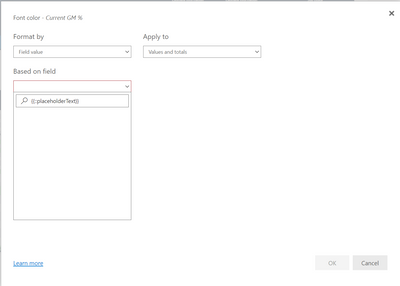
I have a conditionally formatted cell and the first time after starting the desktop I can define the rules etc. in the pop-up screen, but every next time I open the pop-up via the Fx button, the pop-up is shown, but screen is completely blank, so no entry possible.

I restarted my computer, issue remains.

Any one having the same issue?

1 ACCEPTED SOLUTION
AndreAbbema
Frequent Visitor

Seems to be reported in Pop up windows are blank - Microsoft Power BI Community


Provided solution that works for me:

Unticked Power BI Desktop infrastructure update Preview option, then restart Power BI Desktop may solve this issue.

View solution in original post

6 REPLIES 6
shwright
Frequent Visitor

I am experiencin the same issue, IT happeded in early Feb and seemed to fix itself but not it is happening again


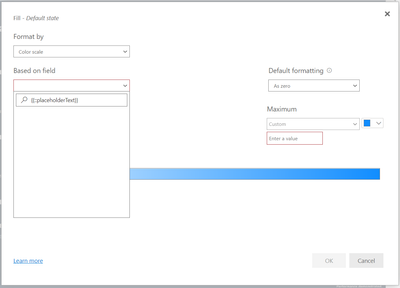
When trying to use conditional formatting in PBI service you are not able to access the list


I am using edge

I have tried clearing cache, deleting favourite and re adding and allowing pop ups


I have also tried disabling the Power BI Infrastructure Update Preview in Desktop and re uploading but stillhave the same issue


shwright_0-1648811590425.png


AndreAbbema
Frequent Visitor

Seems to be reported in Pop up windows are blank - Microsoft Power BI Community


Provided solution that works for me:

Unticked Power BI Desktop infrastructure update Preview option, then restart Power BI Desktop may solve this issue.

Hi There


This solution did not work for me


Do you know if there is a fix to this yet?


amitchandak
Super User
Super User

@AndreAbbema , Not faced it till now. Please uninstall and install again. Also, check any missing windows patch


check if any other user faced this

https://community.powerbi.com/t5/Issues/idb-p/Issues

Share with Power BI Enthusiasts: Full Power BI Video (20 Hours) YouTube
Microsoft Fabric Series 60+ Videos YouTube
Microsoft Fabric Hindi End to End YouTube

@amitchandak I am still having the same issue and not able to edit/ change formatting in PBI Service (It works in PBI Desktop


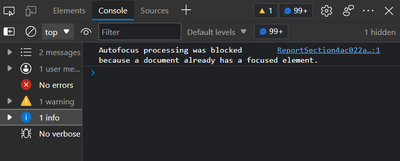
I have also tried disabling the Power BI Infrastructure Update Preview in Desktop and re uploading but still have the same issue


shwright_1-1648943794484.png


shwright_0-1648943772020.png


Uninstall / Install unfortunately didn't help....
All windows patches are installed

Helpful resources

Announcements
New to Fabric survey Carousel

New to Fabric Survey

If you have recently started exploring Fabric, we'd love to hear how it's going. Your feedback can help with product improvements.

Power BI DataViz World Championships carousel

Power BI DataViz World Championships - June 2026

A new Power BI DataViz World Championship is coming this June! Don't miss out on submitting your entry.

Join our Fabric User Panel

Join our Fabric User Panel

Share feedback directly with Fabric product managers, participate in targeted research studies and influence the Fabric roadmap.

March Power BI Update Carousel

Power BI Community Update - March 2026

Check out the March 2026 Power BI update to learn about new features.