Share feedback directly with Fabric product managers, participate in targeted research studies and influence the Fabric roadmap.
Sign up nowGet Fabric certified for FREE! Don't miss your chance! Learn more
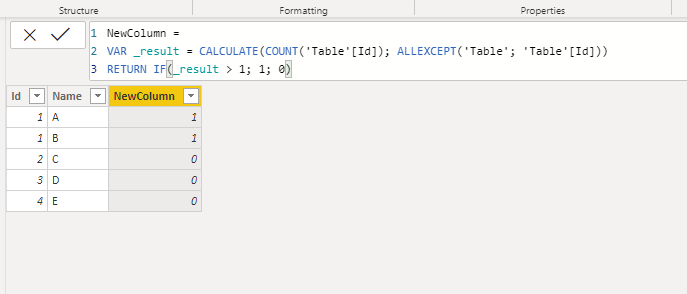
Hi all I have the following table
Id. Name
1. A
1. B
2. C
3. D
4. E
If a particular Id has multiple names attached to it.( For eg id 1 has two names attached to it.). Then i want to show it as 1 in new column. If any id does not have multiple names attached to it then it would show as 0 on new column. I think I have to use if statement but I don't know which formula to use. Thank you
Solved! Go to Solution.
Hi @NISH72 ,
Try this code for a new column:
Hi @NISH72 ,
Try this code for a new column:
Please try this expression for your column
If this works for you, please mark it as solution. Kudos are appreciated too. Please let me know if not.
Regards,
Pat
To learn more about Power BI, follow me on Twitter or subscribe on YouTube.
When I add this formula in the new column it's throwing syntax error. It's not accepting return if function. Thank you
@NISH72 ,
Try with comma:
The syntax is correct now but still I am not getting desired results. The new column is showing 0 for all rows. Thank you
If you love stickers, then you will definitely want to check out our Community Sticker Challenge!
Check out the January 2026 Power BI update to learn about new features.
| User | Count |
|---|---|
| 62 | |
| 60 | |
| 45 | |
| 21 | |
| 18 |
| User | Count |
|---|---|
| 122 | |
| 117 | |
| 37 | |
| 34 | |
| 30 |