cancel
Showing results for 
Search instead for 
Did you mean: 

The Power BI Data Visualization World Championships is back! Get ahead of the game and start preparing now! Learn more

Reply
NISH72
Helper IV
Helper IV

Conditional calculated column

Hi all I have the following table

Id.     Name

1.       A

1.        B

2.        C

3.        D

4.        E


If a particular Id has multiple names attached to it.( For eg id 1 has two names attached to it.). Then i want to show it as 1 in new column. If any id  does not have multiple names attached to it then it would show as 0 on new column. I think I have to use if statement but I don't know which formula to use. Thank you

1 ACCEPTED SOLUTION
camargos88
Community Champion
Community Champion

Hi @NISH72 ,


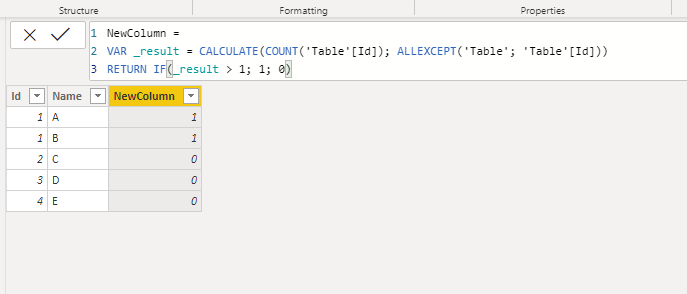
Try this code for a new column:

NewColumn =
VAR _result = CALCULATE(COUNT('Table'[Id]); ALLEXCEPT('Table'; 'Table'[Id]))
RETURN IF(_result > 1; 1; 0)
 
Capture.PNG


Did I answer your question? Mark my post as a solution!

Proud to be a Super User!


View solution in original post

6 REPLIES 6
camargos88
Community Champion
Community Champion

Hi @NISH72 ,


Try this code for a new column:

NewColumn =
VAR _result = CALCULATE(COUNT('Table'[Id]); ALLEXCEPT('Table'; 'Table'[Id]))
RETURN IF(_result > 1; 1; 0)
 
Capture.PNG


Did I answer your question? Mark my post as a solution!

Proud to be a Super User!


Please try this expression for your column


Duplicates = var currentid = 'ID'[Id]
var countthisid = COUNTROWS(Filter('ID', 'ID'[Id]=currentid))
return if(countthisid>1,1,0)
 

If this works for you, please mark it as solution.  Kudos are appreciated too.  Please let me know if not.

Regards,

Pat


Did I answer your question? Mark my post as a solution! Kudos are also appreciated!

To learn more about Power BI, follow me on Twitter or subscribe on YouTube.


@mahoneypa HoosierBI on YouTube


When I add this formula in the new column it's throwing syntax error. It's not accepting return if function. Thank you

@NISH72 ,


Try with comma:


NewColumn =
VAR _result = CALCULATE(COUNT('Table'[Id]), ALLEXCEPT('Table', 'Table'[Id]))
RETURN IF(_result > 1, 1, 0)


Did I answer your question? Mark my post as a solution!

Proud to be a Super User!


The syntax is correct now but still I am not getting desired results. The new column is showing 0 for all rows. Thank you

@NISH72 ,


Did you check the posted photo ? Is that the result ?


Did I answer your question? Mark my post as a solution!

Proud to be a Super User!


Helpful resources

Announcements
Power BI DataViz World Championships

Power BI Dataviz World Championships

The Power BI Data Visualization World Championships is back! Get ahead of the game and start preparing now!

December 2025 Power BI Update Carousel

Power BI Monthly Update - December 2025

Check out the December 2025 Power BI Holiday Recap!

FabCon Atlanta 2026 carousel

FabCon Atlanta 2026

Join us at FabCon Atlanta, March 16-20, for the ultimate Fabric, Power BI, AI and SQL community-led event. Save $200 with code FABCOMM.

Top Solution Authors