Don't miss your chance to take the Fabric Data Engineer (DP-600) exam for FREE! Find out how by attending the DP-600 session on April 23rd (pacific time), live or on-demand.
Learn moreNext up in the FabCon + SQLCon recap series: The roadmap for Microsoft SQL and Maximizing Developer experiences in Fabric. All sessions are available on-demand after the live show. Register now
Hi,
I need some help identifying rows with conditional logic in poweBI Desktop, I've outlined the details below.
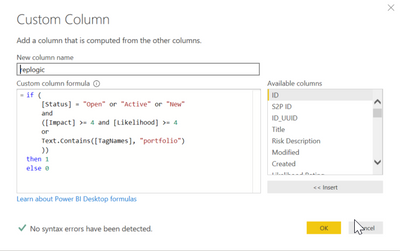
I've attempted to create a new custom column within the query editor with the following conditions:
repLogic =
if (
[Status] = "Open" or "Active" or "New"
and
([Impact] >= 4 and [Likelihood] >= 4
or
Text.Contains([TagNames], "portfolio")
))
then 1
else 0
I don't get any syntax errors but its clearly not working how I intended it to 😉
I get the following error in most but not all rows:
Expression.Error: We cannot convert the value "Active" to type Logical.
Details:
Value=Active
Type=Type
I understand that I'm mixing boolean with text so I'll need to find a way to convert the [Status] value to a boolean.
My questions:
Solved! Go to Solution.
@tstraker try following code
if (
( [Status] = "Open" or [Status] = "Active" or [Status] = "New")
and
(
([Impact] >= 4 and [Likelihood] >= 4)
or
Text.Contains([TagNames], "portfolio")
)
then 1
else 0
Subscribe to the @PowerBIHowTo YT channel for an upcoming video on List and Record functions in Power Query!!
Learn Power BI and Fabric - subscribe to our YT channel - Click here: @PowerBIHowTo
If my solution proved useful, I'd be delighted to receive Kudos. When you put effort into asking a question, it's equally thoughtful to acknowledge and give Kudos to the individual who helped you solve the problem. It's a small gesture that shows appreciation and encouragement! ❤
Did I answer your question? Mark my post as a solution. Proud to be a Super User! Appreciate your Kudos 🙂
Feel free to email me with any of your BI needs.
@tstraker try following code
if (
( [Status] = "Open" or [Status] = "Active" or [Status] = "New")
and
(
([Impact] >= 4 and [Likelihood] >= 4)
or
Text.Contains([TagNames], "portfolio")
)
then 1
else 0
Subscribe to the @PowerBIHowTo YT channel for an upcoming video on List and Record functions in Power Query!!
Learn Power BI and Fabric - subscribe to our YT channel - Click here: @PowerBIHowTo
If my solution proved useful, I'd be delighted to receive Kudos. When you put effort into asking a question, it's equally thoughtful to acknowledge and give Kudos to the individual who helped you solve the problem. It's a small gesture that shows appreciation and encouragement! ❤
Did I answer your question? Mark my post as a solution. Proud to be a Super User! Appreciate your Kudos 🙂
Feel free to email me with any of your BI needs.
Thanks @parry2k
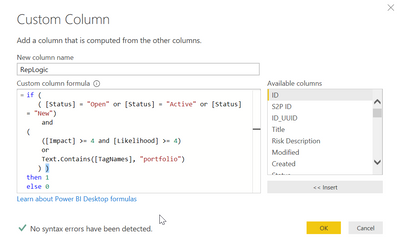
I was prompted for an additional right parenthesis, I added that and ran it (screenshot below).
I then had to clean up a few null values in my [TagNames] and [Status] fields but it worked!
Thanks for the tweak!
If you have recently started exploring Fabric, we'd love to hear how it's going. Your feedback can help with product improvements.
A new Power BI DataViz World Championship is coming this June! Don't miss out on submitting your entry.
Experience the highlights from FabCon & SQLCon, available live and on-demand starting April 14th.
| User | Count |
|---|---|
| 47 | |
| 44 | |
| 40 | |
| 20 | |
| 15 |
| User | Count |
|---|---|
| 70 | |
| 68 | |
| 32 | |
| 27 | |
| 25 |