cancel
Showing results for 
Search instead for 
Did you mean: 

July 7 - July 17 | Round 2 of the Power BI Dataviz World Championships. Don't miss your chance! Learn more

Reply
tstraker
Frequent Visitor

Conditional Logic - help

Hi,

I need some help identifying rows with conditional logic in poweBI Desktop, I've outlined the details below.


  1. I have a risk table in my project. [RiskCombined]
  2. I want to report on all Open, Active or New risks
  3. I want to then filter to all risks with an impact and likelihood rating of 4 and above
  4. I also want to highlight any risks with a tag of "portfolio" irrespective of their impact and likelihood rating in step 3 (an escalation tag).

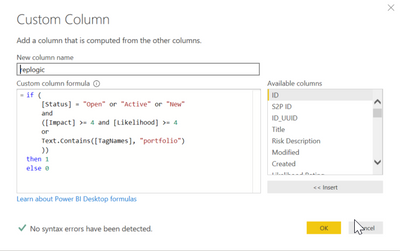
I've attempted to create a new custom column within the query editor with the following conditions:


repLogic = 
if (
    [Status] = "Open" or "Active" or "New"
    and
    ([Impact] >= 4 and [Likelihood] >= 4
    or
    Text.Contains([TagNames], "portfolio")
    ))
then 1
else 0
 
1.png
 
The Idea is that I would visualize all risks with a replogic value of 1


I don't get any syntax errors but its clearly not working how I intended it to 😉


I get the following error in most but not all rows:


Expression.Error: We cannot convert the value "Active" to type Logical.
Details:
    Value=Active
    Type=Type


I understand that I'm mixing boolean with text so I'll need to find a way to convert the [Status] value to a boolean.


My questions:


  1.  What's the best/quickest way to get a true/false value that I can use to filter risks (based on the criteria above)
  2.  Should I be using a measure or a series of measures instead of a cal column?
  3.  Should I be using VARS in this case?
  4. Can anyone provide me with an example?
1 ACCEPTED SOLUTION
parry2k
Super User
Super User

@tstraker try following code


if (
   ( [Status] = "Open" or [Status] = "Active" or [Status] = "New")
    and
(
    ([Impact] >= 4 and [Likelihood] >= 4)
    or
    Text.Contains([TagNames], "portfolio")
   )
then 1
else 0


Subscribe to the @PowerBIHowTo YT channel for an upcoming video on List and Record functions in Power Query!!

Learn Power BI and Fabric - subscribe to our YT channel - Click here: @PowerBIHowTo

If my solution proved useful, I'd be delighted to receive Kudos. When you put effort into asking a question, it's equally thoughtful to acknowledge and give Kudos to the individual who helped you solve the problem. It's a small gesture that shows appreciation and encouragement! ❤


Did I answer your question? Mark my post as a solution. Proud to be a Super User! Appreciate your Kudos 🙂
Feel free to email me with any of your BI needs.

View solution in original post

2 REPLIES 2
parry2k
Super User
Super User

@tstraker try following code


if (
   ( [Status] = "Open" or [Status] = "Active" or [Status] = "New")
    and
(
    ([Impact] >= 4 and [Likelihood] >= 4)
    or
    Text.Contains([TagNames], "portfolio")
   )
then 1
else 0


Subscribe to the @PowerBIHowTo YT channel for an upcoming video on List and Record functions in Power Query!!

Learn Power BI and Fabric - subscribe to our YT channel - Click here: @PowerBIHowTo

If my solution proved useful, I'd be delighted to receive Kudos. When you put effort into asking a question, it's equally thoughtful to acknowledge and give Kudos to the individual who helped you solve the problem. It's a small gesture that shows appreciation and encouragement! ❤


Did I answer your question? Mark my post as a solution. Proud to be a Super User! Appreciate your Kudos 🙂
Feel free to email me with any of your BI needs.

Thanks @parry2k 


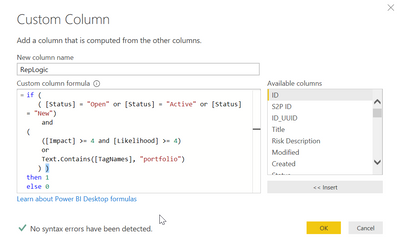
I was prompted for an additional right parenthesis, I added that and ran it (screenshot below).

3.png

I then had to clean up a few null values in my [TagNames] and [Status] fields but it worked!
Thanks for the tweak!


Helpful resources

Announcements
FabCon and SQLCon Barcelona 2026

FabCon & SQLCon – Barcelona 2026

Join us in Barcelona for FabCon and SQLCon, the Fabric, Power BI, SQL, and AI community event. Save €200 with code FABCMTY200.

60 days of Data Days Carousel

Data Days 2026

Join Data Days 2026: 60 days of free live/on-demand sessions, challenges, study groups, and certification opportunities.

Power BI DataViz World Championships carousel

Power BI DataViz World Championships - June 2026

A new Power BI DataViz World Championship is coming this June! Don't miss out on submitting your entry.

Top Solution Authors