Don't miss your chance to take the Fabric Data Engineer (DP-600) exam for FREE! Find out how by watching the DP-600 session on-demand now through April 28th.
Learn moreJoin the FabCon + SQLCon recap series. Up next: Power BI, Real-Time Intelligence, IQ and AI, and Data Factory take center stage. All sessions are available on-demand after the live show. Register now
Hi,
I need some help identifying rows with conditional logic in poweBI Desktop, I've outlined the details below.
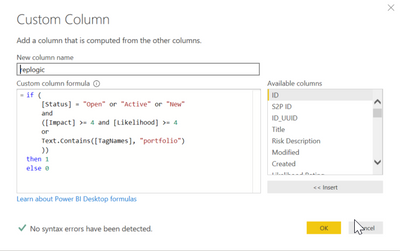
I've attempted to create a new custom column within the query editor with the following conditions:
repLogic =
if (
[Status] = "Open" or "Active" or "New"
and
([Impact] >= 4 and [Likelihood] >= 4
or
Text.Contains([TagNames], "portfolio")
))
then 1
else 0
I don't get any syntax errors but its clearly not working how I intended it to 😉
I get the following error in most but not all rows:
Expression.Error: We cannot convert the value "Active" to type Logical.
Details:
Value=Active
Type=Type
I understand that I'm mixing boolean with text so I'll need to find a way to convert the [Status] value to a boolean.
My questions:
Solved! Go to Solution.
@tstraker try following code
if (
( [Status] = "Open" or [Status] = "Active" or [Status] = "New")
and
(
([Impact] >= 4 and [Likelihood] >= 4)
or
Text.Contains([TagNames], "portfolio")
)
then 1
else 0
Subscribe to the @PowerBIHowTo YT channel for an upcoming video on List and Record functions in Power Query!!
Learn Power BI and Fabric - subscribe to our YT channel - Click here: @PowerBIHowTo
If my solution proved useful, I'd be delighted to receive Kudos. When you put effort into asking a question, it's equally thoughtful to acknowledge and give Kudos to the individual who helped you solve the problem. It's a small gesture that shows appreciation and encouragement! ❤
Did I answer your question? Mark my post as a solution. Proud to be a Super User! Appreciate your Kudos 🙂
Feel free to email me with any of your BI needs.
@tstraker try following code
if (
( [Status] = "Open" or [Status] = "Active" or [Status] = "New")
and
(
([Impact] >= 4 and [Likelihood] >= 4)
or
Text.Contains([TagNames], "portfolio")
)
then 1
else 0
Subscribe to the @PowerBIHowTo YT channel for an upcoming video on List and Record functions in Power Query!!
Learn Power BI and Fabric - subscribe to our YT channel - Click here: @PowerBIHowTo
If my solution proved useful, I'd be delighted to receive Kudos. When you put effort into asking a question, it's equally thoughtful to acknowledge and give Kudos to the individual who helped you solve the problem. It's a small gesture that shows appreciation and encouragement! ❤
Did I answer your question? Mark my post as a solution. Proud to be a Super User! Appreciate your Kudos 🙂
Feel free to email me with any of your BI needs.
Thanks @parry2k
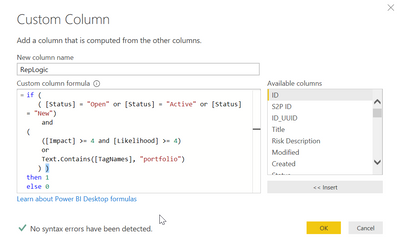
I was prompted for an additional right parenthesis, I added that and ran it (screenshot below).
I then had to clean up a few null values in my [TagNames] and [Status] fields but it worked!
Thanks for the tweak!
Check out the April 2026 Power BI update to learn about new features.
If you have recently started exploring Fabric, we'd love to hear how it's going. Your feedback can help with product improvements.
A new Power BI DataViz World Championship is coming this June! Don't miss out on submitting your entry.
| User | Count |
|---|---|
| 42 | |
| 37 | |
| 34 | |
| 21 | |
| 16 |
| User | Count |
|---|---|
| 65 | |
| 62 | |
| 31 | |
| 26 | |
| 25 |