cancel
Showing results for 
Search instead for 
Did you mean: 

July 7 - July 17 | Round 2 of the Power BI Dataviz World Championships. Don't miss your chance! Learn more

Reply
MatthewMcD
Regular Visitor

Conditional Formatting

Brand new and on the steep learning curve for PowerBI...


I see a lot of people asking for Conditional Formatting. I would like to do something akin to "info graphics" in Excel, where the values "High, Med, and Low" are replaced with red, yellow, green icons.


Then I found this article: https://powerbi.microsoft.com/en-us/documentation/powerbi-desktop-conditional-table-formatting/


Can anyone explain how to get this to work? The visuals and menu in my PBI Desktop do not exist. It is VERY frustrating to have an article out there that does not match the UI I see in the product. Are there different versions?

1 ACCEPTED SOLUTION

Ok so it is possible, here are the steps:


First upload/host these icons (images) somewhere where these can be accessed publically, I'm calling these 3 files as below


warning.png

failed.png

passed.png

unknown.png


You can give your own name to these file and change formula accordingly.


1. Add new column to you dataset, may be call it "ImageURL" add this formula


ImageURL = 
CONCATENATE("http://mywebsite/path/",
if(myTable[Level] = "Warning", "warning.png"
if(myTable[Level] = "Failed", "failed.png"
if(myTable[Level] = "Info", "passed.png", "unknown.png"
))))

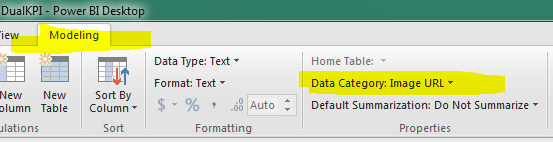
2, On Data modelling tab, set Data Category for ImageURL to Image URL (as shown below)


imageurl.PNG


3. Now add table visual on your canvas and add following fields from your table:


Name

Level

ImageURL


and you will see icons based on the images.


THanks,

Parv


Subscribe to the @PowerBIHowTo YT channel for an upcoming video on List and Record functions in Power Query!!

Learn Power BI and Fabric - subscribe to our YT channel - Click here: @PowerBIHowTo

If my solution proved useful, I'd be delighted to receive Kudos. When you put effort into asking a question, it's equally thoughtful to acknowledge and give Kudos to the individual who helped you solve the problem. It's a small gesture that shows appreciation and encouragement! ❤


Did I answer your question? Mark my post as a solution. Proud to be a Super User! Appreciate your Kudos 🙂
Feel free to email me with any of your BI needs.

View solution in original post

23 REPLIES 23

@parry2k so i have been using a calculated column to return a 1 or 0 and using that for the green or yellow (see code below - Current).  In order to implement this I created a new calculated column to return "Trained", "Warning 90", "Warning 60", "Warning 30" or "Expired" (see code below - New)


Current

Fire_Ext = IF (CALCULATE ( COUNTROWS ( FireEx ), FILTER ( FireEx, FireEx[User ID] = CESEBASE[EmplID] ) )> 0, 1,0)

 New

FE_Status = 
IF (
    CALCULATE (
        COUNTROWS ( FireEx ),
        FILTER ( FireEx, FireEx[User ID] = CESEBASE[EmplID] )
    )
        > 0,
    IF (
        FireEx[Transcript Completed Date] + 455
            > TODAY (),
        "Trained",
        IF (
            FireEx[Transcript Completed Date] + 425
                > TODAY (),
            "Warning 90",
            IF (
                FireEx[Transcript Completed Date] + 395
                    > TODAY (),
                "Warning 60",
                IF ( FireEx[Transcript Completed Date] > TODAY (), "Warning 30", "Expired" )
            )
        )
    ),
    "Expired"
)

 with this for ImageURL

ImageURL = 
	CONCATENATE("https://mywebsite/Icons/",
		if (CESEBASE[FE_Status]= "Warning 30", "Warning30.png",
		if (CESEBASE[FE_Status]= "Warning 60", "Warning60.png",
		if (CESEBASE[FE_Status]= "Warning 90", "Warning90.png",
		if (CESEBASE[FE_Status]= "Trained", "Trained.png",
		if (CESEBASE[FE_Status]= "Expired", "Expired.png", "Expired.png"
		))))))

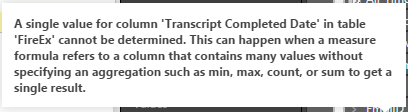
The FE_Status is showing this error, sorry I'm pretty new to all of this so any help is appreciated.

Error Message 

 Here are my icons

Icons

Sorry cannt see you error message, can you post images again.


Subscribe to the @PowerBIHowTo YT channel for an upcoming video on List and Record functions in Power Query!!

Learn Power BI and Fabric - subscribe to our YT channel - Click here: @PowerBIHowTo

If my solution proved useful, I'd be delighted to receive Kudos. When you put effort into asking a question, it's equally thoughtful to acknowledge and give Kudos to the individual who helped you solve the problem. It's a small gesture that shows appreciation and encouragement! ❤


Did I answer your question? Mark my post as a solution. Proud to be a Super User! Appreciate your Kudos 🙂
Feel free to email me with any of your BI needs.

Error.png

Helpful resources

Announcements
FabCon and SQLCon Barcelona 2026

FabCon & SQLCon – Barcelona 2026

Join us in Barcelona for FabCon and SQLCon, the Fabric, Power BI, SQL, and AI community event. Save €200 with code FABCMTY200.

60 days of Data Days Carousel

Data Days 2026

Join Fabric Data Days 2026: 60 days of free live/on-demand sessions, challenges, study groups, and certification opportunities.

Power BI DataViz World Championships carousel

Power BI DataViz World Championships - June 2026

A new Power BI DataViz World Championship is coming this June! Don't miss out on submitting your entry.