Don't miss your chance to take the Fabric Data Engineer (DP-700) exam on us!
Learn moreWe've captured the moments from FabCon & SQLCon that everyone is talking about, and we are bringing them to the community, live and on-demand. Starts on April 14th. Register now
Hi all,
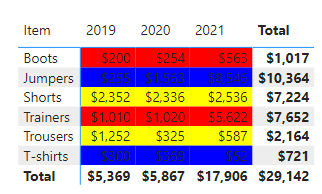
Just after a bit of DAX help - or suggestions on any other way I can achieve this.. I have a matrix similar to the below:
I want the background of the Cells to be a certain colour based on the Item. e.g. Trainers and Boots = Red, T-shirts and Jumpers = Blue, Trousers and Shorts = Yellow.
| Item | 2019 | 2020 | 2021 |
| Trainers | 1010 | 1020 | 5622 |
Boots | 200 | 254 | 563 |
| T-shirts | 300 | 369 | 52 |
| Jumpers | 255 | 1563 | 8546 |
| Trousers | 1252 | 325 | 587 |
| Shorts | 2352 | 2336 | 2536 |
I have created a SWITCH measure ( =SWITCH(SELECTEDVALUE(Sales[Item]), "Trainers", "Red", "Boots", "Red", "T-shirts", "Blue" etc) so that I can assign the values a certain background colour using conditional fomatting- but I want the actual Item cells to have the background colour..
Any suggestions welcome
thanks
Sarah
Solved! Go to Solution.
You mean that instead of this
you want the row header background color changed? Bad news I'm afraid.
You mean that instead of this
you want the row header background color changed? Bad news I'm afraid.
Yes.. I wanted just the row headers to be coloured.
I've had no luck finding a solution.
Thanks
Currently the conditional formatting feature isn't applied on the row/column headers. It is only applied on Values fields. I'm afraid there is no such solution or workaround to format their background at present.
There are some similar ideas about this requirement you can vote up:
Microsoft Idea - Conditional Formatting of Row Headers in Matrix
Microsoft Idea - conditional formatting
Microsoft Idea - Condititonal Formatting for Row Header
Best Regards,
Community Support Team _ Jing
If this post helps, please Accept it as Solution to help other members find it.
If you have recently started exploring Fabric, we'd love to hear how it's going. Your feedback can help with product improvements.
A new Power BI DataViz World Championship is coming this June! Don't miss out on submitting your entry.
Share feedback directly with Fabric product managers, participate in targeted research studies and influence the Fabric roadmap.
| User | Count |
|---|---|
| 55 | |
| 40 | |
| 35 | |
| 19 | |
| 18 |
| User | Count |
|---|---|
| 71 | |
| 70 | |
| 38 | |
| 35 | |
| 23 |