cancel
Showing results for 
Search instead for 
Did you mean: 

Level up your Power BI skills this month - build one visual each week and tell better stories with data! Get started

Reply
RishabhDhingra
New Member

Conditional Formatting based on Expressions

Hi All,


I have created a measure for Profit Alert which says if Profit is between ... and ... then "Ok", between .... and .... "Warning" else "Low". Now I have a bar chart against the Region dimension.


I would like to color the bar based on Profit Alert. However, when I place Profit Alert on Color Saturation I get diverging colors option. I was expecting to see three different colors for three different string values of Profit Alert.


Is this not possible to achieve in Power BI Desktop yet? If not, is there a workaround to achieve this?


Thanks,

Rishabh

3 REPLIES 3
konstantinos
Memorable Member
Memorable Member

I cannot think a way yet to add a dynamic measure specially when it returns text or segments.


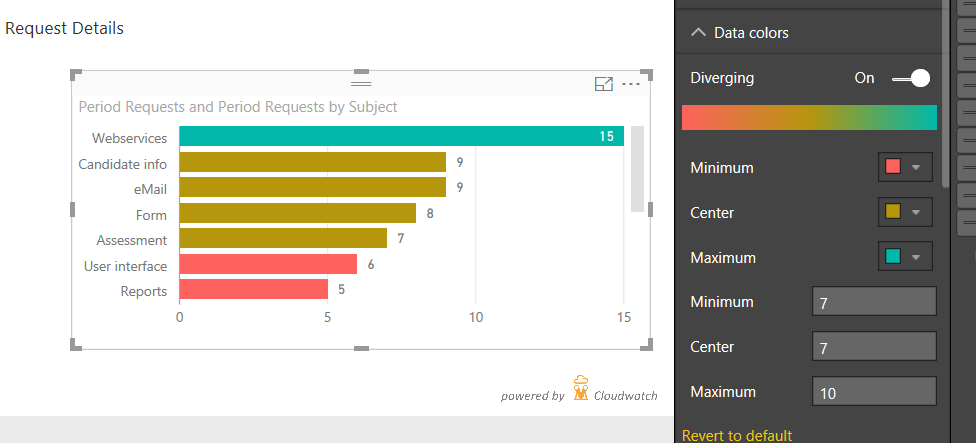
You can achieve the 3 color scale ( if the Profit Alert is not dynamic - meaning the between values are static ) if you pass these values to the format pane. You add the profit measure also in the saturation field/place and the in the formatting options of the chart ( suppose a bar - column chart ) under Data colors you Select Diverging ON and then add manually the values and colors of Min, Center, Max. The first two Min, Center must be the same number or really close if you need distinc colors. You can play around with the limits. 


Untitled.png


Konstantinos Ioannou

@konstantinos, the method I usually use is to create a measure similar to what @RishabhDhingra has made, but returning -1, 0, 1 based on the conditions required. Then the diverging colors can be set for those numbers. This is very similar to the KPI implementation in SSAS and Power Pivot.

@greggyb Thanks..didn't thought that..This way can also be combined with dynamic target/limits..

Konstantinos Ioannou

Helpful resources

Announcements
April Power BI Update Carousel

Power BI Monthly Update - April 2026

Check out the April 2026 Power BI update to learn about new features.

Fabric SQL PBI Data Days

Data Days 2026 coming soon!

Sign up to receive a private message when registration opens and key events begin.

New to Fabric survey Carousel

New to Fabric Survey

If you have recently started exploring Fabric, we'd love to hear how it's going. Your feedback can help with product improvements.

Power BI DataViz World Championships carousel

Power BI DataViz World Championships - June 2026

A new Power BI DataViz World Championship is coming this June! Don't miss out on submitting your entry.