cancel
Showing results for 
Search instead for 
Did you mean: 

July 7 - July 17 | Round 2 of the Power BI Dataviz World Championships. Don't miss your chance! Learn more

Reply
RishabhDhingra
New Member

Conditional Formatting based on Expressions

Hi All,


I have created a measure for Profit Alert which says if Profit is between ... and ... then "Ok", between .... and .... "Warning" else "Low". Now I have a bar chart against the Region dimension.


I would like to color the bar based on Profit Alert. However, when I place Profit Alert on Color Saturation I get diverging colors option. I was expecting to see three different colors for three different string values of Profit Alert.


Is this not possible to achieve in Power BI Desktop yet? If not, is there a workaround to achieve this?


Thanks,

Rishabh

3 REPLIES 3
konstantinos
Memorable Member
Memorable Member

I cannot think a way yet to add a dynamic measure specially when it returns text or segments.


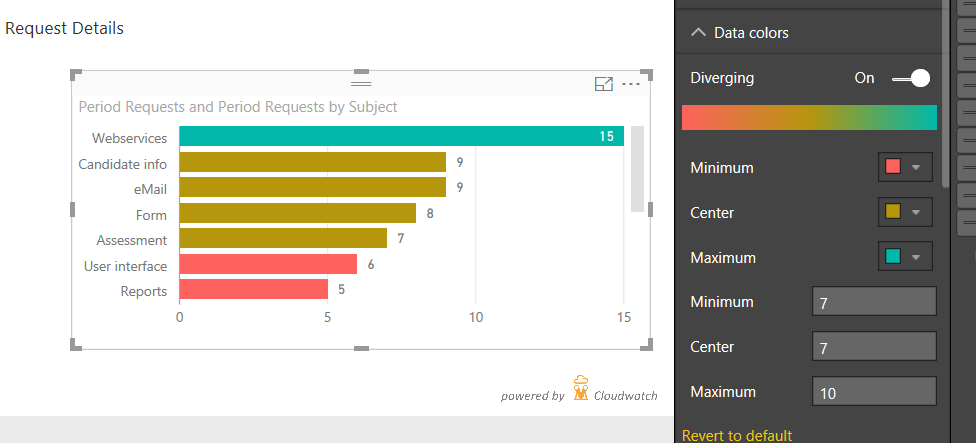
You can achieve the 3 color scale ( if the Profit Alert is not dynamic - meaning the between values are static ) if you pass these values to the format pane. You add the profit measure also in the saturation field/place and the in the formatting options of the chart ( suppose a bar - column chart ) under Data colors you Select Diverging ON and then add manually the values and colors of Min, Center, Max. The first two Min, Center must be the same number or really close if you need distinc colors. You can play around with the limits. 


Untitled.png


Konstantinos Ioannou

@konstantinos, the method I usually use is to create a measure similar to what @RishabhDhingra has made, but returning -1, 0, 1 based on the conditions required. Then the diverging colors can be set for those numbers. This is very similar to the KPI implementation in SSAS and Power Pivot.

@greggyb Thanks..didn't thought that..This way can also be combined with dynamic target/limits..

Konstantinos Ioannou

Helpful resources

Announcements
FabCon and SQLCon Barcelona 2026

FabCon & SQLCon – Barcelona 2026

Join us in Barcelona for FabCon and SQLCon, the Fabric, Power BI, SQL, and AI community event. Save €200 with code FABCMTY200.

Fabric Community Sticker Design Challenge Barcelona Carousel

Fabric Community Sticker Challenge - Barcelona 2026

If you love stickers, then you will definitely want to check out our community sticker challenge, Barcelona edition!

July Power BI Update Carousel

Power BI Monthly Update - July 2026

Check out the July 2026 Power BI update to learn about new features.

Power BI DataViz World Championships carousel

Power BI DataViz World Championships - June 2026

A new Power BI DataViz World Championship is coming this June! Don't miss out on submitting your entry.

Top Solution Authors