cancel
Showing results for 
Search instead for 
Did you mean: 

The Power BI Data Visualization World Championships is back! It's time to submit your entry. Live now!

Reply
Anonymous
Not applicable

Conditional Formatting Text Color in a Table

Hi


I have a column in a table visual which I want to color based upon the value. So the values are text and there are only three uniqe possiblities and i want to give each option a Green, Red or a Gray color.


I already checked the conditional formatting option but that is around a numeric value but not text. 


Any clues as to how to do it efficiently?


Thanks

1 ACCEPTED SOLUTION
jdbuchanan71
Super User
Super User

@Anonymous 

You need to write a measure to read the value of the cell then return the name of the color.


Formatting = 
VAR _Value = SELECTEDVALUE ( 'Table'[Value] )
RETURN
SWITCH (
    _Value,
    "West","Green",
    "Central","Gray",
    "East","Red"
)


You would change West, Central, East to match your values.

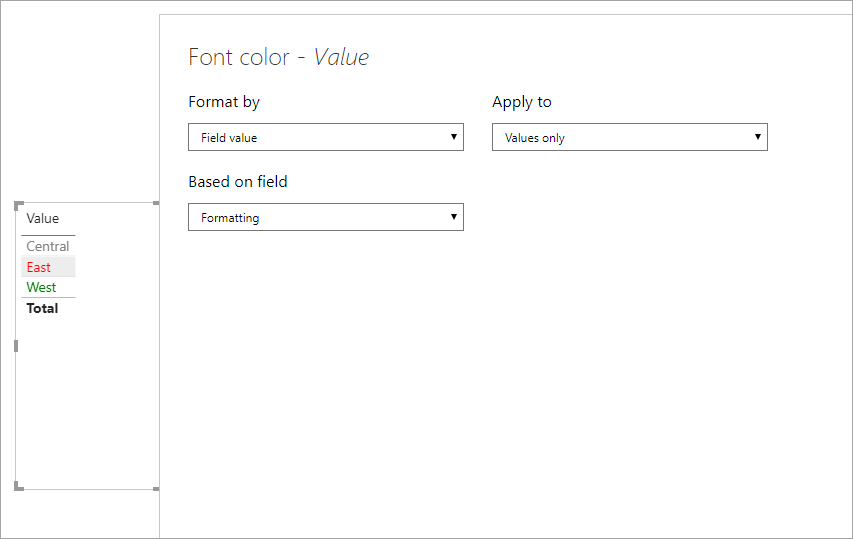
Then you apply conditional formatting to the column > font color based on the Field value of the [Formatting] measure.

jdbuchanan71_0-1593465873652.png

I attached a sample file for you to take a look at.

View solution in original post

2 REPLIES 2
nandic
Resident Rockstar
Resident Rockstar

Hi,
My approach is this: go to dimension where you have a field based on which you would like to set background color.
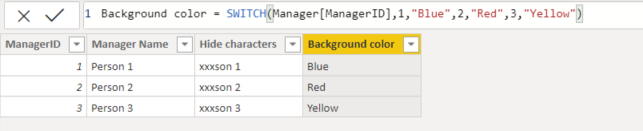
Add new column which sets color based on specific criteria (or add that column in source).
Example:
Text background color column.PNG


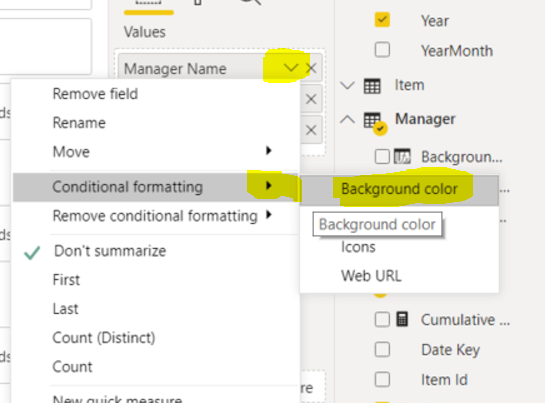
Then select table and add conditional formatting to desired field:
Text background color column steps 1.PNG


Define logic:
Text background color column steps 2.PNG
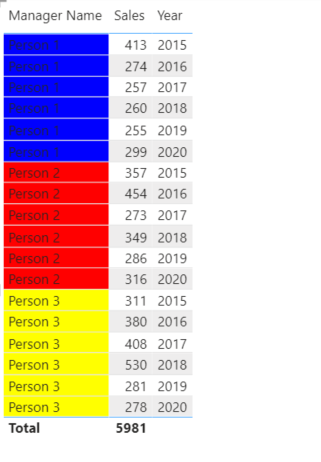
And this is final result:
Text background color column final result.PNG

Cheers,
Nemanja


jdbuchanan71
Super User
Super User

@Anonymous 

You need to write a measure to read the value of the cell then return the name of the color.


Formatting = 
VAR _Value = SELECTEDVALUE ( 'Table'[Value] )
RETURN
SWITCH (
    _Value,
    "West","Green",
    "Central","Gray",
    "East","Red"
)


You would change West, Central, East to match your values.

Then you apply conditional formatting to the column > font color based on the Field value of the [Formatting] measure.

jdbuchanan71_0-1593465873652.png

I attached a sample file for you to take a look at.

Helpful resources

Announcements
Power BI DataViz World Championships

Power BI Dataviz World Championships

The Power BI Data Visualization World Championships is back! It's time to submit your entry.

December 2025 Power BI Update Carousel

Power BI Monthly Update - December 2025

Check out the December 2025 Power BI Holiday Recap!

FabCon Atlanta 2026 carousel

FabCon Atlanta 2026

Join us at FabCon Atlanta, March 16-20, for the ultimate Fabric, Power BI, AI and SQL community-led event. Save $200 with code FABCOMM.