cancel
Showing results for 
Search instead for 
Did you mean: 

The Power BI Data Visualization World Championships is back! It's time to submit your entry. Live now!

Reply
Anonymous
Not applicable

Conditional Formatting Text Color in a Table

Hi


I have a column in a table visual which I want to color based upon the value. So the values are text and there are only three uniqe possiblities and i want to give each option a Green, Red or a Gray color.


I already checked the conditional formatting option but that is around a numeric value but not text. 


Any clues as to how to do it efficiently?


Thanks

1 ACCEPTED SOLUTION
jdbuchanan71
Super User
Super User

@Anonymous 

You need to write a measure to read the value of the cell then return the name of the color.


Formatting = 
VAR _Value = SELECTEDVALUE ( 'Table'[Value] )
RETURN
SWITCH (
    _Value,
    "West","Green",
    "Central","Gray",
    "East","Red"
)


You would change West, Central, East to match your values.

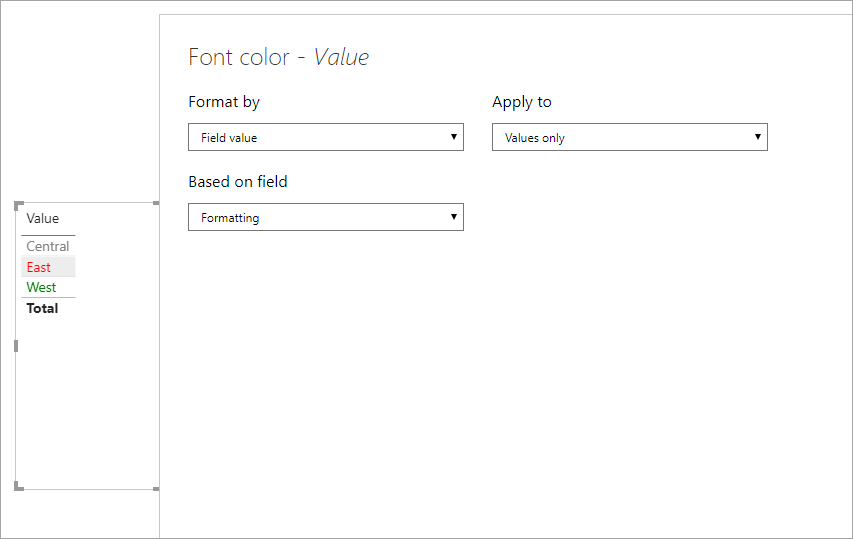
Then you apply conditional formatting to the column > font color based on the Field value of the [Formatting] measure.

jdbuchanan71_0-1593465873652.png

I attached a sample file for you to take a look at.

View solution in original post

2 REPLIES 2
nandic
Resident Rockstar
Resident Rockstar

Hi,
My approach is this: go to dimension where you have a field based on which you would like to set background color.
Add new column which sets color based on specific criteria (or add that column in source).
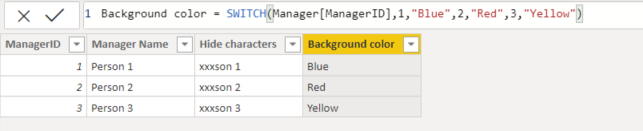
Example:
Text background color column.PNG


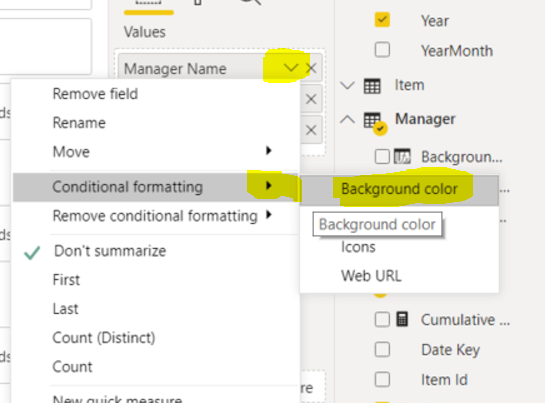
Then select table and add conditional formatting to desired field:
Text background color column steps 1.PNG


Define logic:
Text background color column steps 2.PNG
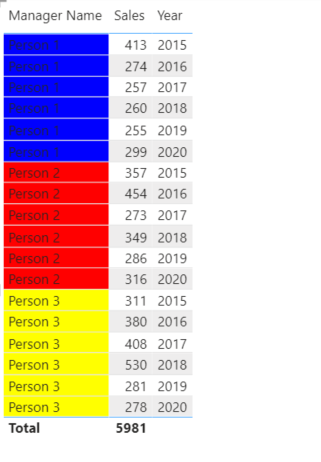
And this is final result:
Text background color column final result.PNG

Cheers,
Nemanja


jdbuchanan71
Super User
Super User

@Anonymous 

You need to write a measure to read the value of the cell then return the name of the color.


Formatting = 
VAR _Value = SELECTEDVALUE ( 'Table'[Value] )
RETURN
SWITCH (
    _Value,
    "West","Green",
    "Central","Gray",
    "East","Red"
)


You would change West, Central, East to match your values.

Then you apply conditional formatting to the column > font color based on the Field value of the [Formatting] measure.

jdbuchanan71_0-1593465873652.png

I attached a sample file for you to take a look at.

Helpful resources

Announcements
December 2025 Power BI Update Carousel

Power BI Monthly Update - December 2025

Check out the December 2025 Power BI Holiday Recap!

FabCon Atlanta 2026 carousel

FabCon Atlanta 2026

Join us at FabCon Atlanta, March 16-20, for the ultimate Fabric, Power BI, AI and SQL community-led event. Save $200 with code FABCOMM.