cancel
Showing results for 
Search instead for 
Did you mean: 

Learn from the best! Meet the four finalists headed to the FINALS of the Power BI Dataviz World Championships! Register now

Reply
StephenH
Frequent Visitor

Conditional Formatting Slicer

Hi All,


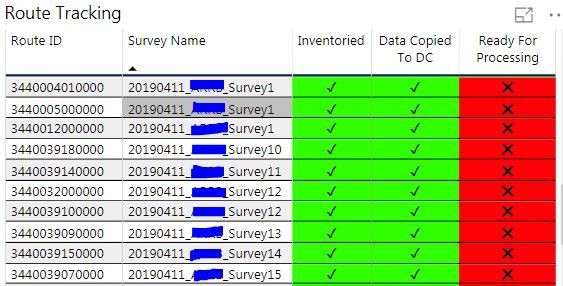
I am having an issue with slicer affecting my conditional formatting. I have a tracking table that that shows the status of the data collection, (inventoried, copied and ready for processing). For each field i created a new field to display the boolean values as unicode (UNICHAR ( 10060 ), UNICHAR ( 10004 )) and then created another new field where i converted the values from Boolean to Numeric. I am using the unicode fields for the conditional formatting based on the numeric field value (0,1).Capture.JPG

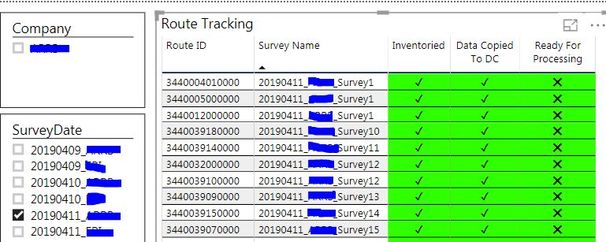
This part works fine, but where i am running into issues is when i use slicer to filter by date the conditional formatting stops working. If a select a date, it filters everything properly but the conditional formatting does not work.


Capture2.JPG


Does anybody have any ideas?  

1 ACCEPTED SOLUTION
v-piga-msft
Resident Rockstar
Resident Rockstar

Hi @StephenH ,

If I understand your scenario correctly that you said that the slicer will stop the conditional formatting?

If it is, I cannot reporduce your scenario by my test in the latest version of Power BI Desktop.

Capture.PNG

Please check if you have installed the latest version of Power BI Desktop 2.68.5432.841.

If you still need help, please share a dummy pbix file which can reproduce the scenario, so that we can help further investigate on it? You can upload it to OneDrive and post the link here. Do mask sensitive data before uploading.

Best Regards,

Cherry


Community Support Team _ Cherry Gao
If this post helps, then please consider Accept it as the solution to help the other members find it more quickly.

View solution in original post

2 REPLIES 2
v-piga-msft
Resident Rockstar
Resident Rockstar

Hi @StephenH ,

If I understand your scenario correctly that you said that the slicer will stop the conditional formatting?

If it is, I cannot reporduce your scenario by my test in the latest version of Power BI Desktop.

Capture.PNG

Please check if you have installed the latest version of Power BI Desktop 2.68.5432.841.

If you still need help, please share a dummy pbix file which can reproduce the scenario, so that we can help further investigate on it? You can upload it to OneDrive and post the link here. Do mask sensitive data before uploading.

Best Regards,

Cherry


Community Support Team _ Cherry Gao
If this post helps, then please consider Accept it as the solution to help the other members find it more quickly.

Cherry, 


Thanks for the response, I updated Power BI and then deleted the conditional formatting. I redid the conditional formatting to use Format By Rules which fixed the problem.  I appreciate your help on this issue!


Stephen

Helpful resources

Announcements
Join our Fabric User Panel

Join our Fabric User Panel

Share feedback directly with Fabric product managers, participate in targeted research studies and influence the Fabric roadmap.

February Power BI Update Carousel

Power BI Monthly Update - February 2026

Check out the February 2026 Power BI update to learn about new features.

FabCon Atlanta 2026 carousel

FabCon Atlanta 2026

Join us at FabCon Atlanta, March 16-20, for the ultimate Fabric, Power BI, AI and SQL community-led event. Save $200 with code FABCOMM.