Get Fabric or SQL Certified for Free.
Get certified for free when you join Fabric Data Days 2026 and dive into Fabric, Power BI, SQL, AI, and other essential data skills.
Join now- Power BI forums
- Get Help with Power BI
- Desktop
- Service
- Report Server
- Power Query
- Mobile Apps
- Developer
- DAX Commands and Tips
- Custom Visuals Development Discussion
- Health and Life Sciences
- Power BI Spanish forums
- Translated Spanish Desktop
- Training and Consulting
- Instructor Led Training
- Dashboard in a Day for Women, by Women
- Galleries
- Data Stories Gallery
- Themes Gallery
- Contests Gallery
- QuickViz Gallery
- Quick Measures Gallery
- Visual Calculations Gallery
- Notebook Gallery
- Translytical Task Flow Gallery
- TMDL Gallery
- R Script Showcase
- Webinars and Video Gallery
- Ideas
- Custom Visuals Ideas (read-only)
- Issues
- Issues
- Events
- Upcoming Events
July 7 - July 17 | Round 2 of the Power BI Dataviz World Championships. Don't miss your chance! Learn more
- Power BI forums
- Forums
- Get Help with Power BI
- Desktop
- custom button
- Subscribe to RSS Feed
- Mark Topic as New
- Mark Topic as Read
- Float this Topic for Current User
- Bookmark
- Subscribe
- Printer Friendly Page


- Mark as New
- Bookmark
- Subscribe
- Mute
- Subscribe to RSS Feed
- Permalink
- Report Inappropriate Content
custom button
Hi All,
I created a custom button to link as a bookmark to 3 graphs that have been overlapped, which worked out correctly, but for some reason when I create a new graph that is seperate to the overlapping graphs, the created button is also linked to this, I have tried to uncheck the filter for the new graph but this doesnt work.....
Any ideas?
TIA
Solved! Go to Solution.


- Mark as New
- Bookmark
- Subscribe
- Mute
- Subscribe to RSS Feed
- Permalink
- Report Inappropriate Content
A dummy report would be great,
If understand right the 4th graph should not be visible when a button is pressed, is this correct?
Sorry for all the question. English is not my first language so i'm just making sure i understand the issue correctly
- Mark as New
- Bookmark
- Subscribe
- Mute
- Subscribe to RSS Feed
- Permalink
- Report Inappropriate Content
Hi,
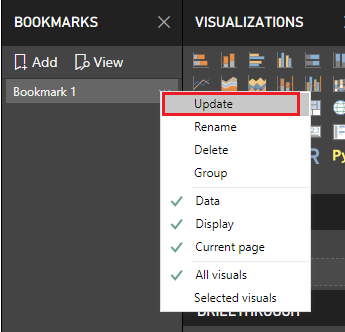
Have you updated the bookmark after you created the 4th graph?
- Mark as New
- Bookmark
- Subscribe
- Mute
- Subscribe to RSS Feed
- Permalink
- Report Inappropriate Content
Hi @Gregory_Felton , many thanks for your response, I didnt know I had to update the bookmarks, is that for each bookmark that I have for each of the graphs apart from the 4th?
- Mark as New
- Bookmark
- Subscribe
- Mute
- Subscribe to RSS Feed
- Permalink
- Report Inappropriate Content
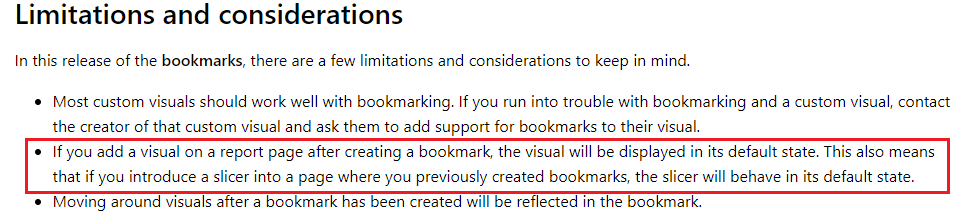
Yeah, you will need to update all bookmarks where the new graph should not be used.
It's one of the limitations and considerations of bookmarks
- Mark as New
- Bookmark
- Subscribe
- Mute
- Subscribe to RSS Feed
- Permalink
- Report Inappropriate Content
Ok thats fine, but even after I update its still changing the 4th graph when I dont want it too, are you able to let me know how to fix it? Im new to Power BI.
- Mark as New
- Bookmark
- Subscribe
- Mute
- Subscribe to RSS Feed
- Permalink
- Report Inappropriate Content
Sure, but you would need to explain further what exactly your bookmarks should achieve.
Are you hiding the graphs until the button is pressed for example
- Mark as New
- Bookmark
- Subscribe
- Mute
- Subscribe to RSS Feed
- Permalink
- Report Inappropriate Content
Yes you are correct, I am hiding the graphs until the button is pressed (I have 3 buttons one for each graph), but the 4th graph should not change when the button(s) are pressed.
- Mark as New
- Bookmark
- Subscribe
- Mute
- Subscribe to RSS Feed
- Permalink
- Report Inappropriate Content
When you say change, what exactly should not change?
Is the data on the 4th graph filtered when you press a button?
Also just to make sure, you don't have the possibility to share the pbix as it would make it very easy to give the correct solution if i could see the report myself
- Mark as New
- Bookmark
- Subscribe
- Mute
- Subscribe to RSS Feed
- Permalink
- Report Inappropriate Content
Unfortunately I cannot share the pbix.
I have 3 graphs linked to 3 buttons, the buttons work correctly when clicking on them, they show the correct graph, its just when I create a brand new graph, I dont want it to be linked to any of the buttons. The 4th graph should just be independant.
I can try and create a dummy pbix for reference.
- Mark as New
- Bookmark
- Subscribe
- Mute
- Subscribe to RSS Feed
- Permalink
- Report Inappropriate Content
A dummy report would be great,
If understand right the 4th graph should not be visible when a button is pressed, is this correct?
Sorry for all the question. English is not my first language so i'm just making sure i understand the issue correctly
- Mark as New
- Bookmark
- Subscribe
- Mute
- Subscribe to RSS Feed
- Permalink
- Report Inappropriate Content
Hi @Gordonlilj - I have just managed to figure out the reason why it was populating the 4th graph, when creating the links I had the graph selected in the selection pane when I shouldnt have, and now the issue is sorted.
Thanks for your help.

Helpful resources

FabCon & SQLCon – Barcelona 2026
Join us in Barcelona for FabCon and SQLCon, the Fabric, Power BI, SQL, and AI community event. Save €200 with code FABCMTY200.

Data Days 2026
Join Data Days 2026: 60 days of free live/on-demand sessions, challenges, study groups, and certification opportunities.

Power BI DataViz World Championships - June 2026
A new Power BI DataViz World Championship is coming this June! Don't miss out on submitting your entry.

| User | Count |
|---|---|
| 29 | |
| 23 | |
| 18 | |
| 18 | |
| 15 |


| User | Count |
|---|---|
| 51 | |
| 44 | |
| 43 | |
| 39 | |
| 32 |


