This is best Fabric, Power BI, SQL and AI community event. How do we know? The last event sold out! Save €200 with code FABCMTY200.
Register nowA new Data Days event is coming soon! This time we’re going bigger than ever. Fabric, Power BI, SQL, AI and more. Don't miss out.
Hi All,
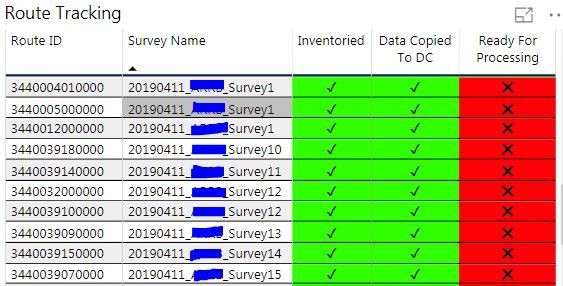
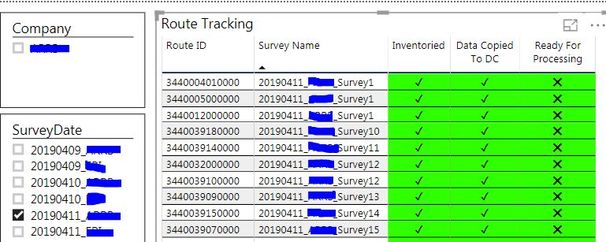
I am having an issue with slicer affecting my conditional formatting. I have a tracking table that that shows the status of the data collection, (inventoried, copied and ready for processing). For each field i created a new field to display the boolean values as unicode (UNICHAR ( 10060 ), UNICHAR ( 10004 )) and then created another new field where i converted the values from Boolean to Numeric. I am using the unicode fields for the conditional formatting based on the numeric field value (0,1).
This part works fine, but where i am running into issues is when i use slicer to filter by date the conditional formatting stops working. If a select a date, it filters everything properly but the conditional formatting does not work.
Does anybody have any ideas?
Solved! Go to Solution.
Hi @StephenH ,
If I understand your scenario correctly that you said that the slicer will stop the conditional formatting?
If it is, I cannot reporduce your scenario by my test in the latest version of Power BI Desktop.
Please check if you have installed the latest version of Power BI Desktop 2.68.5432.841.
If you still need help, please share a dummy pbix file which can reproduce the scenario, so that we can help further investigate on it? You can upload it to OneDrive and post the link here. Do mask sensitive data before uploading.
Best Regards,
Cherry
Hi @StephenH ,
If I understand your scenario correctly that you said that the slicer will stop the conditional formatting?
If it is, I cannot reporduce your scenario by my test in the latest version of Power BI Desktop.
Please check if you have installed the latest version of Power BI Desktop 2.68.5432.841.
If you still need help, please share a dummy pbix file which can reproduce the scenario, so that we can help further investigate on it? You can upload it to OneDrive and post the link here. Do mask sensitive data before uploading.
Best Regards,
Cherry
Cherry,
Thanks for the response, I updated Power BI and then deleted the conditional formatting. I redid the conditional formatting to use Format By Rules which fixed the problem. I appreciate your help on this issue!
Stephen
Check out the May 2026 Power BI update to learn about new features.
Sign up to receive a private message when registration opens and key events begin.
If you have recently started exploring Fabric, we'd love to hear how it's going. Your feedback can help with product improvements.
| User | Count |
|---|---|
| 26 | |
| 25 | |
| 24 | |
| 21 | |
| 14 |
| User | Count |
|---|---|
| 53 | |
| 47 | |
| 23 | |
| 18 | |
| 18 |