This is best Fabric, Power BI, SQL and AI community event. How do we know? The last event sold out! Save €200 with code FABCMTY200.
Register nowThe Fabric community is upgrading! Read all of the details including the timeline and what you can expect. Learn more
Hi,
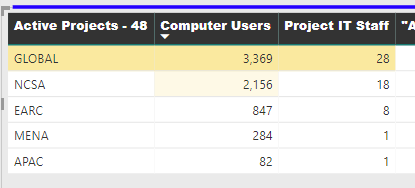
Is there a way I can do a rule or something in the conditional formatting to add a background color for the highest number without typing the number?
For example, Right now Im doing "greather than > 20" because right now the highest is over 20 but if any of the other go over 20 then they will get a background color and I dont want that. and If I do the range then it shows like the middle one and I want only the top one to get highlighted. Maybe an IF statement ike (IF[ProjectITStaff]=MAXVALUE,1,2) I could use the 1 and 2 in the conditional formatting as stable numbers. I can't figure out the IF statement
Solved! Go to Solution.
Hi @Anonymous
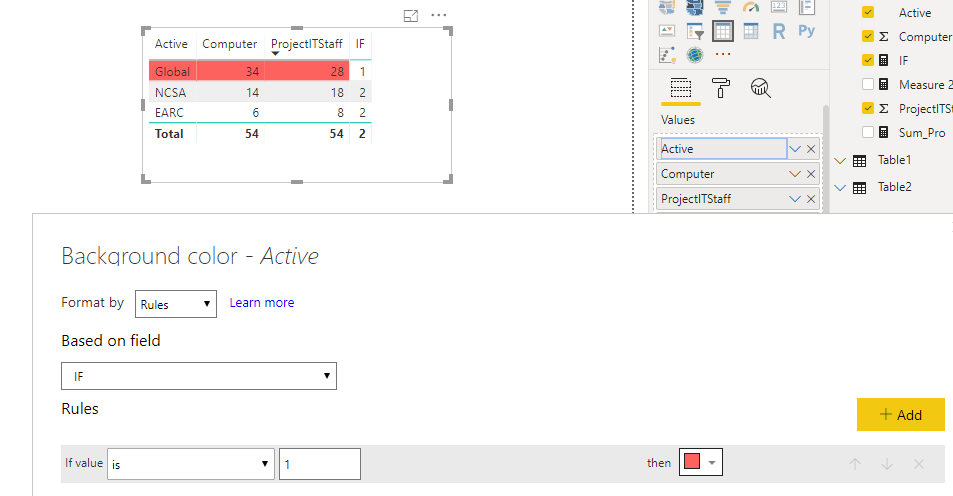
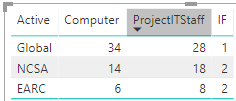
You may use the IF measure in conditional formatting as below for each column.
Regards,
This is not solved.
Hi @Anonymous
You may create measures as below:
Sum_Pro = CALCULATE(SUM(Data[ProjectITStaff]),ALLEXCEPT(Data,Data[Active]))
IF = IF(SUM(Data[ProjectITStaff])=MAXX(ALL(Data),[Sum_Pro]),1,2)
Regards,
@v-cherch-msft I want for it to highlight the "Global" row. So the highest number in the global row, not the column header
Hi @Anonymous
You may use the IF measure in conditional formatting as below for each column.
Regards,
Join us in Barcelona for FabCon and SQLCon, the Fabric, Power BI, SQL, and AI community event. Save €200 with code FABCMTY200.
| User | Count |
|---|---|
| 24 | |
| 22 | |
| 20 | |
| 18 | |
| 14 |
| User | Count |
|---|---|
| 27 | |
| 22 | |
| 21 | |
| 20 | |
| 20 |