Share feedback directly with Fabric product managers, participate in targeted research studies and influence the Fabric roadmap.
Sign up nowGet Fabric certified for FREE! Don't miss your chance! Learn more
Hi,
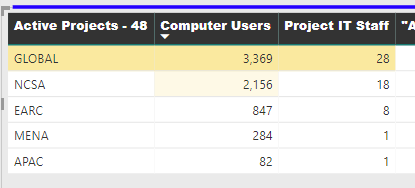
Is there a way I can do a rule or something in the conditional formatting to add a background color for the highest number without typing the number?
For example, Right now Im doing "greather than > 20" because right now the highest is over 20 but if any of the other go over 20 then they will get a background color and I dont want that. and If I do the range then it shows like the middle one and I want only the top one to get highlighted. Maybe an IF statement ike (IF[ProjectITStaff]=MAXVALUE,1,2) I could use the 1 and 2 in the conditional formatting as stable numbers. I can't figure out the IF statement
Solved! Go to Solution.
Hi @Anonymous
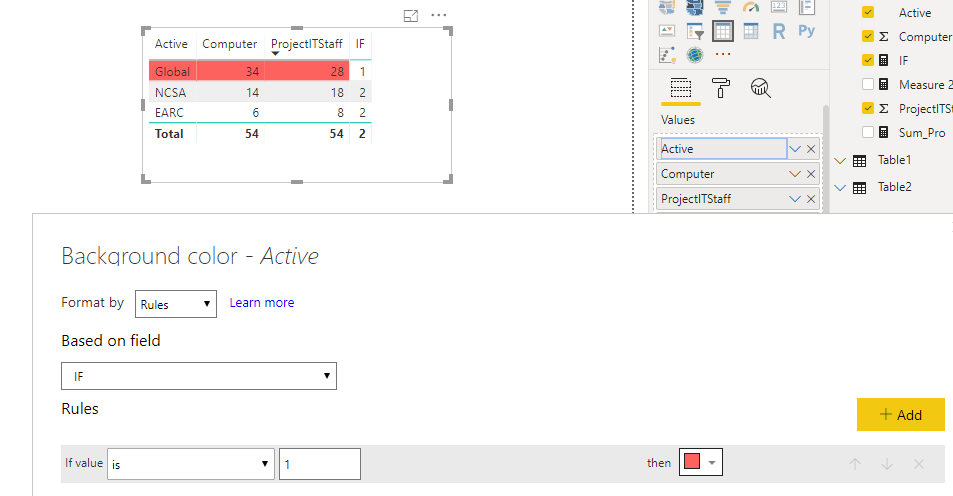
You may use the IF measure in conditional formatting as below for each column.
Regards,
This is not solved.
Hi @Anonymous
You may create measures as below:
Sum_Pro = CALCULATE(SUM(Data[ProjectITStaff]),ALLEXCEPT(Data,Data[Active]))
IF = IF(SUM(Data[ProjectITStaff])=MAXX(ALL(Data),[Sum_Pro]),1,2)
Regards,
@v-cherch-msft I want for it to highlight the "Global" row. So the highest number in the global row, not the column header
Hi @Anonymous
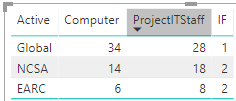
You may use the IF measure in conditional formatting as below for each column.
Regards,
If you love stickers, then you will definitely want to check out our Community Sticker Challenge!
Check out the January 2026 Power BI update to learn about new features.
| User | Count |
|---|---|
| 65 | |
| 65 | |
| 45 | |
| 21 | |
| 18 |
| User | Count |
|---|---|
| 115 | |
| 114 | |
| 38 | |
| 36 | |
| 26 |