This time we’re going bigger than ever. Fabric, Power BI, SQL, AI and more. We're covering it all. You won't want to miss it.
Learn moreDid you hear? There's a new SQL AI Developer certification (DP-800). Start preparing now and be one of the first to get certified. Register now
Hi Foks, Can you please help me on the conditonal Formating in power bi on below conditions.
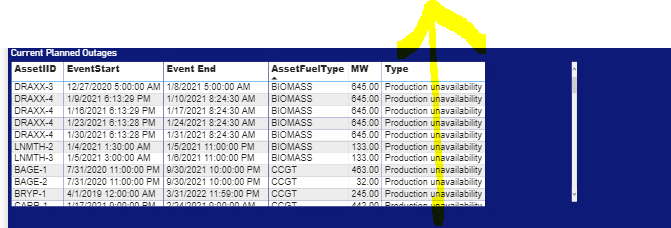
Screen Shot1: Show as power bi file
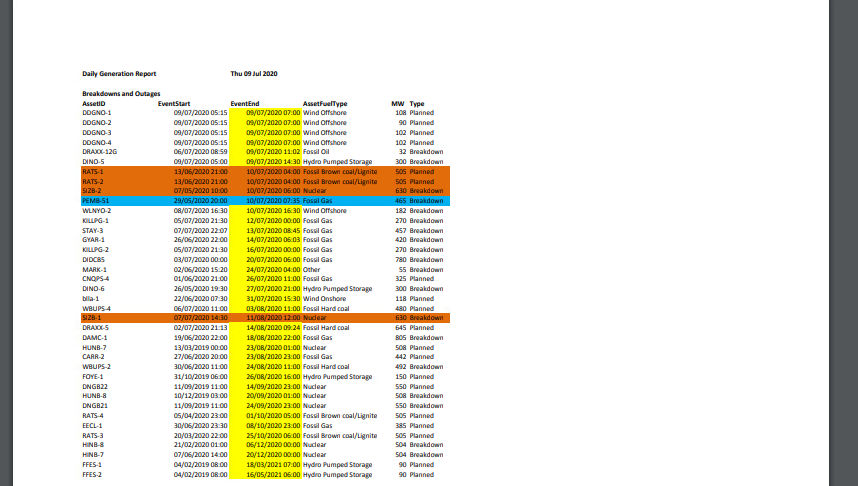
Screen shot 2: As same expected in power bi as this is an excel wireframe.
Solved! Go to Solution.
@Anonymous , See if you create a measure like this; and use it in conditional formatting with "Field Value"
Color Year = if(FIRSTNONBLANK('Table'[Year],2014) <=2016,"lightgreen",if(FIRSTNONBLANK('Table'[Year],2014)>2018,"red","yellow"))
Color = if(FIRSTNONBLANK('Table'[Year],2014) <=2016 && AVERAGE(Sales[Sales Amount])<170
,"lightgreen",if(FIRSTNONBLANK('Table'[Year],2014)>2018,"red","yellow"))
Color sales = if([Sales Today] -[sales yesterday]>0,"green","red")
color =
switch ( true(),
FIRSTNONBLANK('Table'[commodity],"NA") ="commodity1" && sum('Table'[Value]) >500,"lightgreen",
FIRSTNONBLANK('Table'[commodity],"NA") ="commodity2" && sum('Table'[Value]) >1000,"lightgreen",
// Add more conditions
"red"
)
Hi @Anonymous ,
Can you kindly share some sample data and the expected result to me in order to have a clear understanding of your question?
You can save your files in OneDrive, Google Drive, or any other cloud sharing platforms and share the link here.
I can use the sample file for testing to help you solve the problem.
Best Regards,
Yuna
@Anonymous , See if you create a measure like this; and use it in conditional formatting with "Field Value"
Color Year = if(FIRSTNONBLANK('Table'[Year],2014) <=2016,"lightgreen",if(FIRSTNONBLANK('Table'[Year],2014)>2018,"red","yellow"))
Color = if(FIRSTNONBLANK('Table'[Year],2014) <=2016 && AVERAGE(Sales[Sales Amount])<170
,"lightgreen",if(FIRSTNONBLANK('Table'[Year],2014)>2018,"red","yellow"))
Color sales = if([Sales Today] -[sales yesterday]>0,"green","red")
color =
switch ( true(),
FIRSTNONBLANK('Table'[commodity],"NA") ="commodity1" && sum('Table'[Value]) >500,"lightgreen",
FIRSTNONBLANK('Table'[commodity],"NA") ="commodity2" && sum('Table'[Value]) >1000,"lightgreen",
// Add more conditions
"red"
)
Check out the April 2026 Power BI update to learn about new features.
Sign up to receive a private message when registration opens and key events begin.
If you have recently started exploring Fabric, we'd love to hear how it's going. Your feedback can help with product improvements.
| User | Count |
|---|---|
| 36 | |
| 33 | |
| 31 | |
| 21 | |
| 16 |
| User | Count |
|---|---|
| 65 | |
| 53 | |
| 31 | |
| 23 | |
| 23 |