Join us at FabCon Atlanta from March 16 - 20, 2026, for the ultimate Fabric, Power BI, AI and SQL community-led event. Save $200 with code FABCOMM.
Register now!The Power BI Data Visualization World Championships is back! Get ahead of the game and start preparing now! Learn more
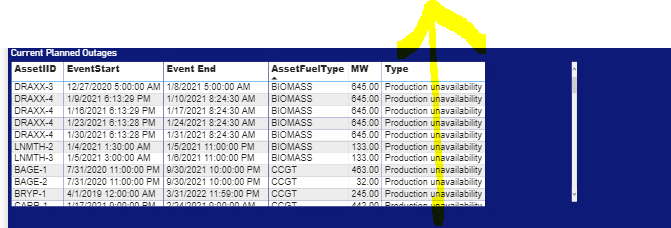
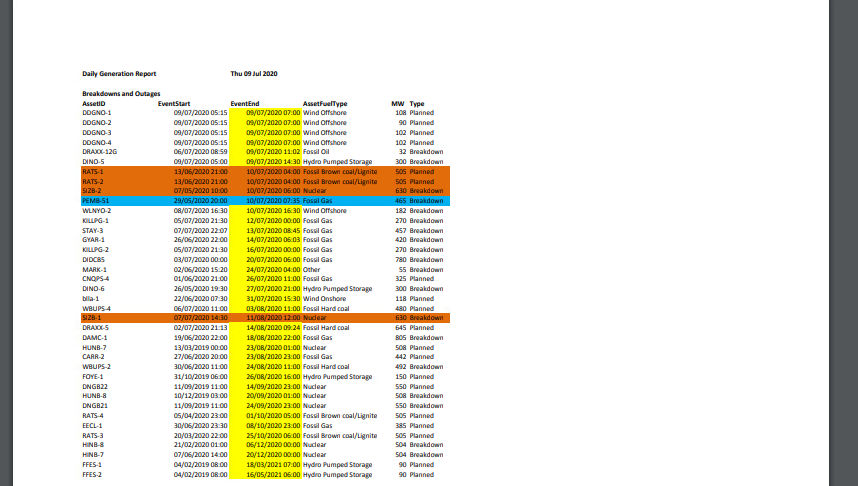
Hi Foks, Can you please help me on the conditonal Formating in power bi on below conditions.
Screen Shot1: Show as power bi file
Screen shot 2: As same expected in power bi as this is an excel wireframe.
Solved! Go to Solution.
@Anonymous , See if you create a measure like this; and use it in conditional formatting with "Field Value"
Color Year = if(FIRSTNONBLANK('Table'[Year],2014) <=2016,"lightgreen",if(FIRSTNONBLANK('Table'[Year],2014)>2018,"red","yellow"))
Color = if(FIRSTNONBLANK('Table'[Year],2014) <=2016 && AVERAGE(Sales[Sales Amount])<170
,"lightgreen",if(FIRSTNONBLANK('Table'[Year],2014)>2018,"red","yellow"))
Color sales = if([Sales Today] -[sales yesterday]>0,"green","red")
color =
switch ( true(),
FIRSTNONBLANK('Table'[commodity],"NA") ="commodity1" && sum('Table'[Value]) >500,"lightgreen",
FIRSTNONBLANK('Table'[commodity],"NA") ="commodity2" && sum('Table'[Value]) >1000,"lightgreen",
// Add more conditions
"red"
)
Hi @Anonymous ,
Can you kindly share some sample data and the expected result to me in order to have a clear understanding of your question?
You can save your files in OneDrive, Google Drive, or any other cloud sharing platforms and share the link here.
I can use the sample file for testing to help you solve the problem.
Best Regards,
Yuna
@Anonymous , See if you create a measure like this; and use it in conditional formatting with "Field Value"
Color Year = if(FIRSTNONBLANK('Table'[Year],2014) <=2016,"lightgreen",if(FIRSTNONBLANK('Table'[Year],2014)>2018,"red","yellow"))
Color = if(FIRSTNONBLANK('Table'[Year],2014) <=2016 && AVERAGE(Sales[Sales Amount])<170
,"lightgreen",if(FIRSTNONBLANK('Table'[Year],2014)>2018,"red","yellow"))
Color sales = if([Sales Today] -[sales yesterday]>0,"green","red")
color =
switch ( true(),
FIRSTNONBLANK('Table'[commodity],"NA") ="commodity1" && sum('Table'[Value]) >500,"lightgreen",
FIRSTNONBLANK('Table'[commodity],"NA") ="commodity2" && sum('Table'[Value]) >1000,"lightgreen",
// Add more conditions
"red"
)
The Power BI Data Visualization World Championships is back! Get ahead of the game and start preparing now!
| User | Count |
|---|---|
| 39 | |
| 37 | |
| 33 | |
| 32 | |
| 29 |
| User | Count |
|---|---|
| 133 | |
| 88 | |
| 85 | |
| 68 | |
| 64 |