Don't miss your chance to take the Fabric Data Engineer (DP-700) exam on us!
Learn moreWe've captured the moments from FabCon & SQLCon that everyone is talking about, and we are bringing them to the community, live and on-demand. Starts on April 14th. Register now
I am trying to conditional format a matrix that I have based on an average value. If my value falls below "X" I want it to be red, and if the value is greater than "X" I want it to be green. I know I can insert a number, but this will not work as the average number which is the benchmark value is constantly changing as more data is added and refreshed. Does anyone have a solution? Thank you!
Solved! Go to Solution.
Hi @leibowjb,
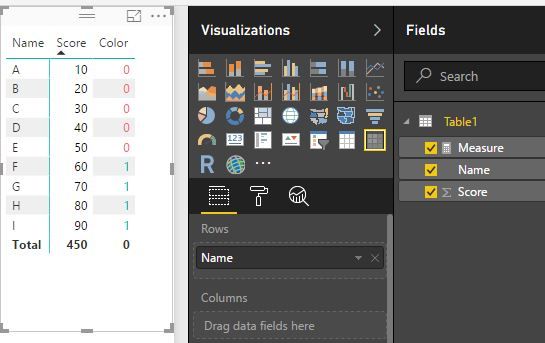
You mean the "X" is dynamic. If so, I'm afraid we can't do it by now. You can submit or vote an idea here: number-formatting and conditional-formatting-cell-highligh-font-etc. Maybe there is a workaround that is creating a like this:
Measure =
VAR averageS =
CALCULATE ( AVERAGE ( Table1[Score] ), ALL ( Table1 ) )
RETURN
IF ( MIN ( 'Table1'[Score] ) <= averageS, 0, 1 )
Best Regards!
Dale
Hi @leibowjb,
You mean the "X" is dynamic. If so, I'm afraid we can't do it by now. You can submit or vote an idea here: number-formatting and conditional-formatting-cell-highligh-font-etc. Maybe there is a workaround that is creating a like this:
Measure =
VAR averageS =
CALCULATE ( AVERAGE ( Table1[Score] ), ALL ( Table1 ) )
RETURN
IF ( MIN ( 'Table1'[Score] ) <= averageS, 0, 1 )
Best Regards!
Dale
If you have recently started exploring Fabric, we'd love to hear how it's going. Your feedback can help with product improvements.
A new Power BI DataViz World Championship is coming this June! Don't miss out on submitting your entry.
Share feedback directly with Fabric product managers, participate in targeted research studies and influence the Fabric roadmap.
| User | Count |
|---|---|
| 53 | |
| 37 | |
| 35 | |
| 19 | |
| 17 |
| User | Count |
|---|---|
| 74 | |
| 70 | |
| 39 | |
| 35 | |
| 23 |