Join us at FabCon Atlanta from March 16 - 20, 2026, for the ultimate Fabric, Power BI, AI and SQL community-led event. Save $200 with code FABCOMM.
Register now!The Power BI Data Visualization World Championships is back! Get ahead of the game and start preparing now! Learn more
I am trying to conditional format a matrix that I have based on an average value. If my value falls below "X" I want it to be red, and if the value is greater than "X" I want it to be green. I know I can insert a number, but this will not work as the average number which is the benchmark value is constantly changing as more data is added and refreshed. Does anyone have a solution? Thank you!
Solved! Go to Solution.
Hi @leibowjb,
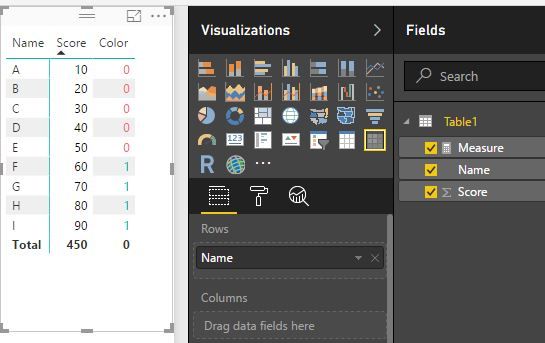
You mean the "X" is dynamic. If so, I'm afraid we can't do it by now. You can submit or vote an idea here: number-formatting and conditional-formatting-cell-highligh-font-etc. Maybe there is a workaround that is creating a like this:
Measure =
VAR averageS =
CALCULATE ( AVERAGE ( Table1[Score] ), ALL ( Table1 ) )
RETURN
IF ( MIN ( 'Table1'[Score] ) <= averageS, 0, 1 )
Best Regards!
Dale
Hi @leibowjb,
You mean the "X" is dynamic. If so, I'm afraid we can't do it by now. You can submit or vote an idea here: number-formatting and conditional-formatting-cell-highligh-font-etc. Maybe there is a workaround that is creating a like this:
Measure =
VAR averageS =
CALCULATE ( AVERAGE ( Table1[Score] ), ALL ( Table1 ) )
RETURN
IF ( MIN ( 'Table1'[Score] ) <= averageS, 0, 1 )
Best Regards!
Dale
The Power BI Data Visualization World Championships is back! Get ahead of the game and start preparing now!
| User | Count |
|---|---|
| 40 | |
| 36 | |
| 34 | |
| 31 | |
| 27 |
| User | Count |
|---|---|
| 135 | |
| 103 | |
| 65 | |
| 61 | |
| 55 |