cancel
Showing results for 
Search instead for 
Did you mean: 

Data Days is here! Join us now for 60+ days of learning, challenges, and connection. Learn more

Reply
jeve
Frequent Visitor

Conditional Format Matrix Values

Hi All,


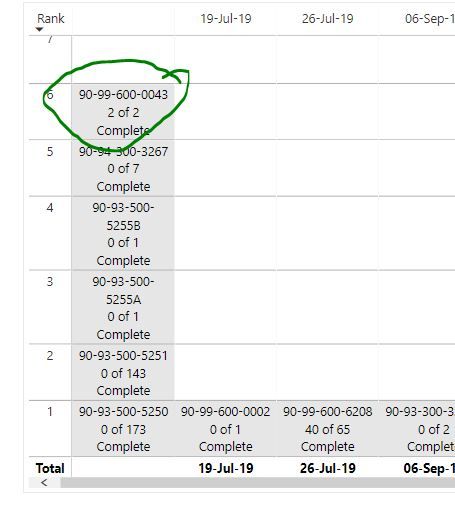
Is it possible to conditionally format the attached matrix chart so that the individual 'box' will highlight green if the % complete column is 100% in the table "Skyline"?


power bi - conditional format 1.JPG


1 ACCEPTED SOLUTION

Hey @jeve 

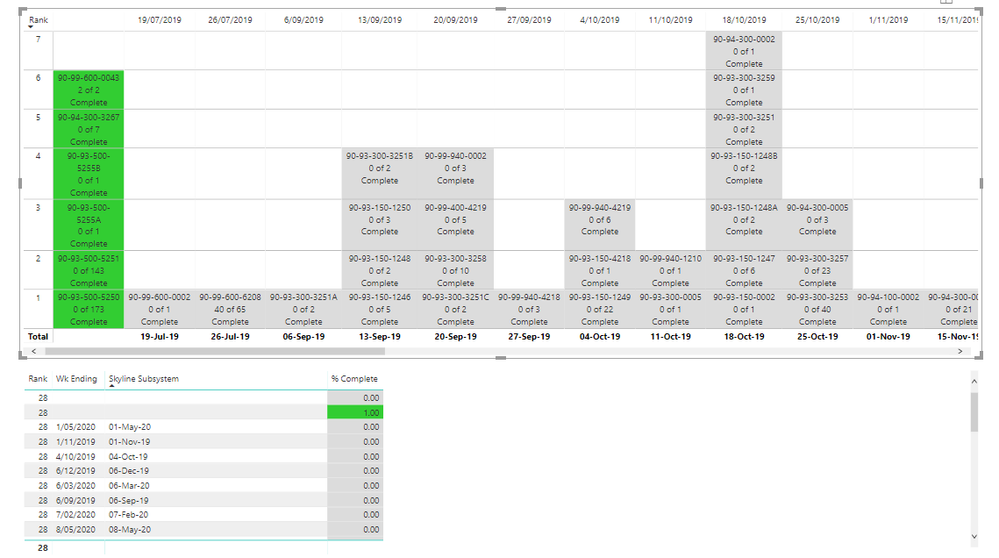
This is as close as you can get with the data you have as far as i can see.

result.PNG

As you can see i can colour a column based on its value but when you place that column into a matrix then this value is part of an aggregation. You will notice that the one row that has a completed and wk ending date is coloured but since all other columns who are missing a value for completed and wk ending date get bundled together and hence get colour too.


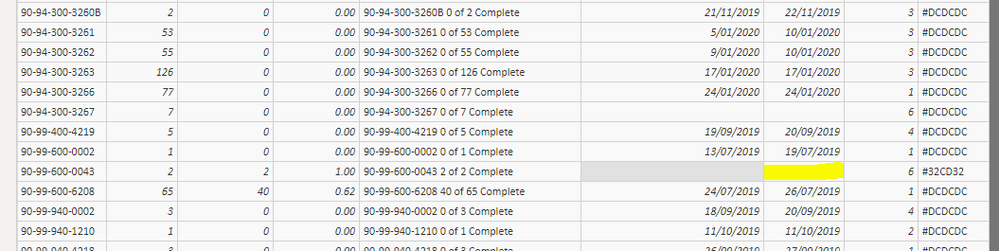
This is the missing pieces in your data.

dataissue.PNG


If you get those blanks filled in you can use thise approch to colour your fields.

I use the approach of using a field value within the conditional formatting and this value is generated via an if statement. 


newcolumn.PNG


hope this helps mate.

View solution in original post

3 REPLIES 3
Aree
Resolver I
Resolver I

Hey @jeve 

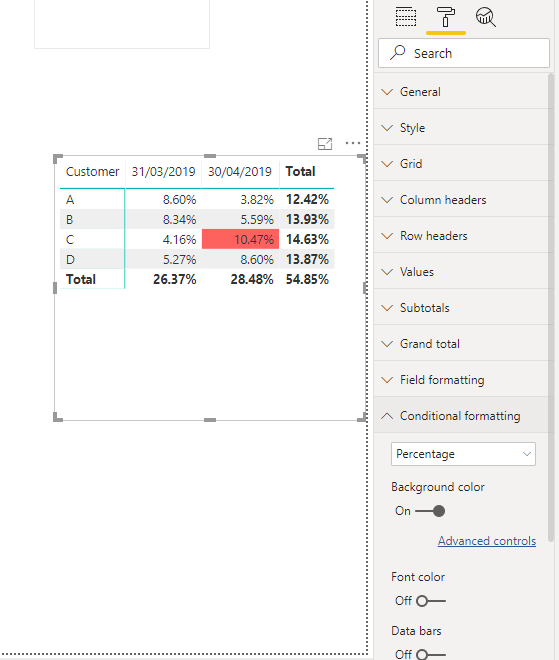
You can conditional format any of the values column in a matrix table.

matrixCF.PNG


In my example i have 

ROWS = Customer

COLUMNS = Date

Values = Percentage


I use the conditional format Rule to set the background colour to be Red for any percentages >0.1 and <=0.11.


Hope that helps mate.

jeve
Frequent Visitor

Hi Aree,


The problem I've got is that I'm dealing with text, not numbers, that require formatting. 


Essentially I need the formatting to format the text depending on the corresponding % column in the Skyline table. My initial request was to highlight if the % column = 100%. Eventually I'll need to have different colour codes for different values in columns that will be added at a later date. For example, % column = 100% and "certificate issued" column (to be added later) contains a date (not blank).


Can conditional formatting lookup values in corresponding cells and format accordingly, per those values?

Hey @jeve 

This is as close as you can get with the data you have as far as i can see.

result.PNG

As you can see i can colour a column based on its value but when you place that column into a matrix then this value is part of an aggregation. You will notice that the one row that has a completed and wk ending date is coloured but since all other columns who are missing a value for completed and wk ending date get bundled together and hence get colour too.


This is the missing pieces in your data.

dataissue.PNG


If you get those blanks filled in you can use thise approch to colour your fields.

I use the approach of using a field value within the conditional formatting and this value is generated via an if statement. 


newcolumn.PNG


hope this helps mate.

Helpful resources

Announcements
Fabric Data Days is here Carousel

Fabric Data Days 2026

Don't miss out on Data Days, June 15 through August 7. Learn Fabric, Power BI, SQL, AI and more.

May Power BI Update Carousel

Power BI Monthly Update - May 2026

Check out the May 2026 Power BI update to learn about new features.

Power BI DataViz World Championships carousel

Power BI DataViz World Championships - June 2026

A new Power BI DataViz World Championship is coming this June! Don't miss out on submitting your entry.