cancel
Showing results for 
Search instead for 
Did you mean: 

We've captured the moments from FabCon & SQLCon that everyone is talking about, and we are bringing them to the community, live and on-demand. Starts on April 14th. Register now

Reply
aalfa
Frequent Visitor

Conditional Format Bar Chart

Hello,


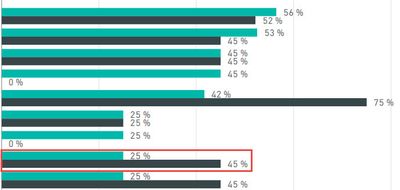
I am trying to create a very simple conditional format on a bar chart where if the first bar is less than the second bar it colors the first bar red. To be more exact, one is Actual % Complete and the second is Expected % Complete. For some reason, I cannot add either value to the "Color Saturation" or even the "Legend" fields. Both fields are a calculated column, not a measure. Please let me know what I may be missing.

25% should be red.25% should be red.

Thank you,

Alex


1 REPLY 1
v-huizhn-msft
Microsoft Employee
Microsoft Employee

Hi @aalfa,

After research, we are unable to set the customer colour for your scenario. We can set the different categories colour suing data colors. For single bar, you can customize the colors used in the color scale using Minimum and Maximum or Diverging color scales. You can create an idea here and also vote this request thread.

Best Regards,
Angelia

Helpful resources

Announcements
New to Fabric survey Carousel

New to Fabric Survey

If you have recently started exploring Fabric, we'd love to hear how it's going. Your feedback can help with product improvements.

Power BI DataViz World Championships carousel

Power BI DataViz World Championships - June 2026

A new Power BI DataViz World Championship is coming this June! Don't miss out on submitting your entry.

Join our Fabric User Panel

Join our Fabric User Panel

Share feedback directly with Fabric product managers, participate in targeted research studies and influence the Fabric roadmap.

March Power BI Update Carousel

Power BI Community Update - March 2026

Check out the March 2026 Power BI update to learn about new features.