Get certified for free when you join Fabric Data Days 2026 and dive into Fabric, Power BI, SQL, AI, and other essential data skills.
Join nowJuly 28 - August 9 | Final Round of the Power BI Dataviz World Championships. This is your chance. Learn more
Hello,
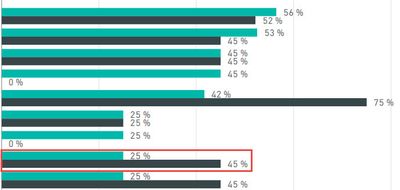
I am trying to create a very simple conditional format on a bar chart where if the first bar is less than the second bar it colors the first bar red. To be more exact, one is Actual % Complete and the second is Expected % Complete. For some reason, I cannot add either value to the "Color Saturation" or even the "Legend" fields. Both fields are a calculated column, not a measure. Please let me know what I may be missing.
25% should be red.
Thank you,
Alex
Hi @aalfa,
After research, we are unable to set the customer colour for your scenario. We can set the different categories colour suing data colors. For single bar, you can customize the colors used in the color scale using Minimum and Maximum or Diverging color scales. You can create an idea here and also vote this request thread.
Best Regards,
Angelia
If you love stickers, then you will definitely want to check out our community sticker challenge, Barcelona edition!
Check out the July 2026 Power BI update to learn about new features.
| User | Count |
|---|---|
| 29 | |
| 28 | |
| 20 | |
| 20 | |
| 19 |
| User | Count |
|---|---|
| 35 | |
| 26 | |
| 20 | |
| 18 | |
| 17 |