This is best Fabric, Power BI, SQL and AI community event. How do we know? The last event sold out! Save €200 with code FABCMTY200.
Register nowA new Data Days event is coming soon! This time we’re going bigger than ever. Fabric, Power BI, SQL, AI and more. Don't miss out.
Hello,
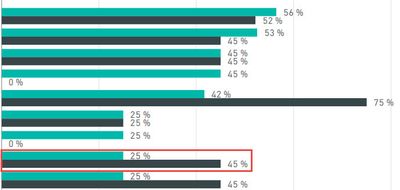
I am trying to create a very simple conditional format on a bar chart where if the first bar is less than the second bar it colors the first bar red. To be more exact, one is Actual % Complete and the second is Expected % Complete. For some reason, I cannot add either value to the "Color Saturation" or even the "Legend" fields. Both fields are a calculated column, not a measure. Please let me know what I may be missing.
25% should be red.
Thank you,
Alex
Hi @aalfa,
After research, we are unable to set the customer colour for your scenario. We can set the different categories colour suing data colors. For single bar, you can customize the colors used in the color scale using Minimum and Maximum or Diverging color scales. You can create an idea here and also vote this request thread.
Best Regards,
Angelia
Check out the May 2026 Power BI update to learn about new features.
Sign up to receive a private message when registration opens and key events begin.
If you have recently started exploring Fabric, we'd love to hear how it's going. Your feedback can help with product improvements.
| User | Count |
|---|---|
| 31 | |
| 26 | |
| 23 | |
| 22 | |
| 15 |
| User | Count |
|---|---|
| 62 | |
| 47 | |
| 28 | |
| 24 | |
| 21 |