cancel
Showing results for 
Search instead for 
Did you mean: 

Get Fabric Certified for FREE during AI Skills Fest. This week only. Secure your voucher now.

Reply
sovereignauto
Helper III
Helper III

Conditional Filter Power Query - Same Column

Afternoon,

Im looking to filter a column [updated_date] (date/time) for the last 2 months or the last 6 months if [type]="ABC"


So all records for the last 6 months where type = "ABC" 

and every other record for the last 2 months 

thank you! 

1 ACCEPTED SOLUTION
v-robertq-msft
Community Support
Community Support

Hi, @sovereignauto 

According to your description, I can clearly understand your requirement, you can try my steps in the Power query:

This is the test data I created:

v-robertq-msft_0-1621246139974.png


  1. Create a custom column and enter it like this:

v-robertq-msft_1-1621246139979.png

if Date.IsInPreviousNMonths([Date],2) or  Date.IsInCurrentMonth([Date])

then

1

else

if Date.IsInPreviousNMonths([Date],6) and [Type]="ABC"

then 1 else 0
  1. Filter the table like this:

v-robertq-msft_2-1621246139985.png


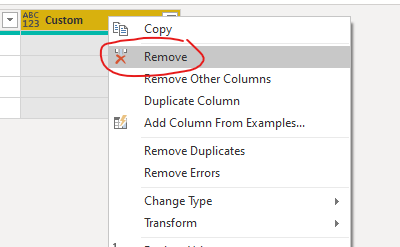
  1. Remove the custom column:

v-robertq-msft_3-1621246139986.png


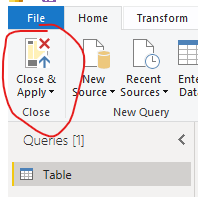
  1. Then click on the “Close and apply” to import the filtered table into the Power BI
v-robertq-msft_4-1621246139987.png


And you can get what you want.

You can download my test pbix file below


If this result is not what you want, you can post some sample data(without sensitive data) and your expected result.

How to Get Your Question Answered Quickly 

Thank you very much!


Best Regards,

Community Support Team _Robert Qin

If this post helps, then please consider Accept it as the solution to help the other members find it more quickly.

View solution in original post

4 REPLIES 4
Anonymous
Not applicable

Hi, If your Source is SQL then You can use "Query Folding" in order to achieve this.
Create a parameter (Parameter_Name) and in the where clause set the condition as follows:
Select * from table_name where the Field_name = Parameter_name

v-robertq-msft
Community Support
Community Support

Hi, @sovereignauto 

According to your description, I can clearly understand your requirement, you can try my steps in the Power query:

This is the test data I created:

v-robertq-msft_0-1621246139974.png


  1. Create a custom column and enter it like this:

v-robertq-msft_1-1621246139979.png

if Date.IsInPreviousNMonths([Date],2) or  Date.IsInCurrentMonth([Date])

then

1

else

if Date.IsInPreviousNMonths([Date],6) and [Type]="ABC"

then 1 else 0
  1. Filter the table like this:

v-robertq-msft_2-1621246139985.png


  1. Remove the custom column:

v-robertq-msft_3-1621246139986.png


  1. Then click on the “Close and apply” to import the filtered table into the Power BI

v-robertq-msft_4-1621246139987.png


And you can get what you want.

You can download my test pbix file below


If this result is not what you want, you can post some sample data(without sensitive data) and your expected result.

How to Get Your Question Answered Quickly 

Thank you very much!


Best Regards,

Community Support Team _Robert Qin

If this post helps, then please consider Accept it as the solution to help the other members find it more quickly.

So i added the Column as you and @amitchandak  suggested. 

i Guess my issue is that it still syncs over 10m records so guess i need to filter before load into powerbi is that right? 

amitchandak
Super User
Super User

@sovereignauto , Try a new column like and then you can filter 


if Date.IsInPreviousNMonths([Date]) && [type]="ABC" then 1 else 0


if need use Date.IsInCurrentMonth


if (Date.IsInPreviousNMonths([Date]) ||   Date.IsInCurrentMonth([Date]) ) && [type]="ABC" then 1 else 0

Share with Power BI Enthusiasts: Full Power BI Video (20 Hours) YouTube
Microsoft Fabric Series 60+ Videos YouTube
Microsoft Fabric Hindi End to End YouTube

Helpful resources

Announcements
May Power BI Update Carousel

Power BI Monthly Update - May 2026

Check out the May 2026 Power BI update to learn about new features.

Fabric SQL PBI Data Days

Data Days 2026 coming soon!

Sign up to receive a private message when registration opens and key events begin.

New to Fabric survey Carousel

New to Fabric Survey

If you have recently started exploring Fabric, we'd love to hear how it's going. Your feedback can help with product improvements.

Power BI DataViz World Championships carousel

Power BI DataViz World Championships - June 2026

A new Power BI DataViz World Championship is coming this June! Don't miss out on submitting your entry.