cancel
Showing results for 
Search instead for 
Did you mean: 

July 7 - July 17 | Round 2 of the Power BI Dataviz World Championships. Don't miss your chance! Learn more

Reply
sovereignauto
Helper III
Helper III

Conditional Filter Power Query - Same Column

Afternoon,

Im looking to filter a column [updated_date] (date/time) for the last 2 months or the last 6 months if [type]="ABC"


So all records for the last 6 months where type = "ABC" 

and every other record for the last 2 months 

thank you! 

1 ACCEPTED SOLUTION
v-robertq-msft
Community Support
Community Support

Hi, @sovereignauto 

According to your description, I can clearly understand your requirement, you can try my steps in the Power query:

This is the test data I created:

v-robertq-msft_0-1621246139974.png


  1. Create a custom column and enter it like this:

v-robertq-msft_1-1621246139979.png

if Date.IsInPreviousNMonths([Date],2) or  Date.IsInCurrentMonth([Date])

then

1

else

if Date.IsInPreviousNMonths([Date],6) and [Type]="ABC"

then 1 else 0
  1. Filter the table like this:

v-robertq-msft_2-1621246139985.png


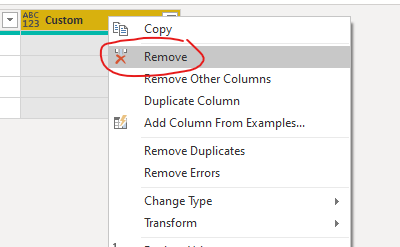
  1. Remove the custom column:

v-robertq-msft_3-1621246139986.png


  1. Then click on the “Close and apply” to import the filtered table into the Power BI
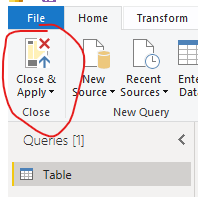
v-robertq-msft_4-1621246139987.png


And you can get what you want.

You can download my test pbix file below


If this result is not what you want, you can post some sample data(without sensitive data) and your expected result.

How to Get Your Question Answered Quickly 

Thank you very much!


Best Regards,

Community Support Team _Robert Qin

If this post helps, then please consider Accept it as the solution to help the other members find it more quickly.

View solution in original post

4 REPLIES 4
Anonymous
Not applicable

Hi, If your Source is SQL then You can use "Query Folding" in order to achieve this.
Create a parameter (Parameter_Name) and in the where clause set the condition as follows:
Select * from table_name where the Field_name = Parameter_name

v-robertq-msft
Community Support
Community Support

Hi, @sovereignauto 

According to your description, I can clearly understand your requirement, you can try my steps in the Power query:

This is the test data I created:

v-robertq-msft_0-1621246139974.png


  1. Create a custom column and enter it like this:

v-robertq-msft_1-1621246139979.png

if Date.IsInPreviousNMonths([Date],2) or  Date.IsInCurrentMonth([Date])

then

1

else

if Date.IsInPreviousNMonths([Date],6) and [Type]="ABC"

then 1 else 0
  1. Filter the table like this:

v-robertq-msft_2-1621246139985.png


  1. Remove the custom column:

v-robertq-msft_3-1621246139986.png


  1. Then click on the “Close and apply” to import the filtered table into the Power BI

v-robertq-msft_4-1621246139987.png


And you can get what you want.

You can download my test pbix file below


If this result is not what you want, you can post some sample data(without sensitive data) and your expected result.

How to Get Your Question Answered Quickly 

Thank you very much!


Best Regards,

Community Support Team _Robert Qin

If this post helps, then please consider Accept it as the solution to help the other members find it more quickly.

So i added the Column as you and @amitchandak  suggested. 

i Guess my issue is that it still syncs over 10m records so guess i need to filter before load into powerbi is that right? 

amitchandak
Super User
Super User

@sovereignauto , Try a new column like and then you can filter 


if Date.IsInPreviousNMonths([Date]) && [type]="ABC" then 1 else 0


if need use Date.IsInCurrentMonth


if (Date.IsInPreviousNMonths([Date]) ||   Date.IsInCurrentMonth([Date]) ) && [type]="ABC" then 1 else 0

Share with Power BI Enthusiasts: Full Power BI Video (20 Hours) YouTube
Microsoft Fabric Series 60+ Videos YouTube
Microsoft Fabric Hindi End to End YouTube

Helpful resources

Announcements
FabCon and SQLCon Barcelona 2026

FabCon & SQLCon – Barcelona 2026

Join us in Barcelona for FabCon and SQLCon, the Fabric, Power BI, SQL, and AI community event. Save €200 with code FABCMTY200.

60 days of Data Days Carousel

Data Days 2026

Join Fabric Data Days 2026: 60 days of free live/on-demand sessions, challenges, study groups, and certification opportunities.

Power BI DataViz World Championships carousel

Power BI DataViz World Championships - June 2026

A new Power BI DataViz World Championship is coming this June! Don't miss out on submitting your entry.

Top Solution Authors