Join us at FabCon Atlanta from March 16 - 20, 2026, for the ultimate Fabric, Power BI, AI and SQL community-led event. Save $200 with code FABCOMM.
Register now!The Power BI Data Visualization World Championships is back! It's time to submit your entry. Live now!
Hello Experts,
Looking for help here. I have a report that pulls data from 11 mil rows and 10 mil rows SAP HANA views in direct query mode. I understand that there are limitations in Direct Query mode. However it takes a while to pull all the data in Import mode. My issue are:
- In Direct Query Mode, I am trying to calculate a measure based on a Dimensional attrinbute. When I use Conditional column in the underlying table/view, I am getting error in the report. Where as When I try to use If statement, for experession parameter with in If Statement, I am not able to select the dimentional attribute. Basically I am trying to calculate Paid Attendance metric with the logical expression If the account code is "4001" then Attendance else 0 end. I am not able to select the account code in If statements. What are the options for conditional calculations in direct query mode given the importing millions of rows takes a while to load the data.
Appreciate taking time in looking into my issues.
- Mani
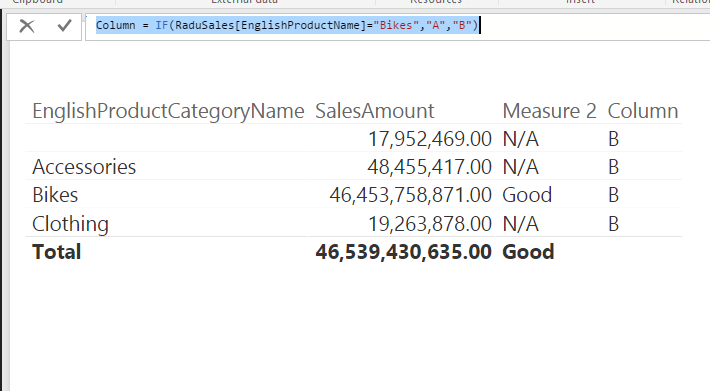
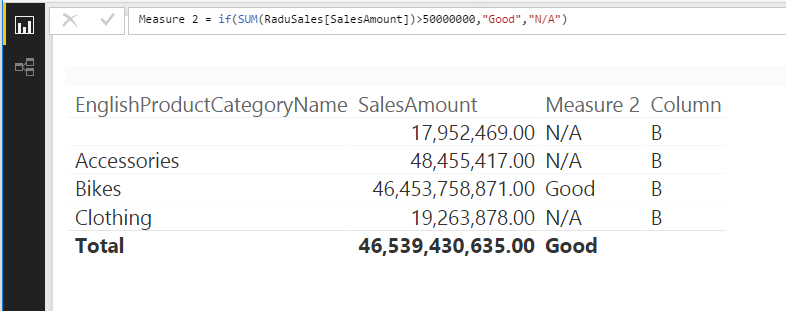
For your Dimensional attrinbute, it's better to create a column other than a measure. I have tested it on my local environment, connect to SAP HANA.
Column = IF(RaduSales[EnglishProductName]="Bikes","A","B")
Measure 2 = if(SUM(RaduSales[SalesAmount])>50000000,"Good","N/A")
If your issue persists, please provide us more detail information, so that we can make further analysis.
Regards,
Charlie Liao
Thanks Charlie for getting back to me.
I am trying to create a measure based on a dimensional attribute, so When I create a measure , in If statement under Logical Test, my dimensional attribute column is not getting listed and it does not allow me to select it as well. I have to have an aggregation like Max, MIn, Distinct with the attribute with in the If statement.
I have a table with Attribute column account code, measures Attendance columns, dates etc. I need to create a paid attendance measure based on Account code. If account code is 4000, then sum(Attendance) is the Paid attendance.
What am I missing ?
The Power BI Data Visualization World Championships is back! It's time to submit your entry.
Check out the January 2026 Power BI update to learn about new features.
| User | Count |
|---|---|
| 60 | |
| 46 | |
| 39 | |
| 23 | |
| 23 |
| User | Count |
|---|---|
| 144 | |
| 106 | |
| 64 | |
| 38 | |
| 31 |