cancel
Showing results for 
Search instead for 
Did you mean: 

The Power BI Data Visualization World Championships is back! Get ahead of the game and start preparing now! Learn more

Reply
balumaran
Frequent Visitor

Conditional Columns or IF Conditions in Direct Query mode

Hello Experts, 

Looking for help here. I have a report that pulls data from 11 mil rows and 10 mil rows SAP HANA views in direct query mode. I understand that there are limitations in Direct Query mode. However it takes a while to pull all the data in Import mode. My issue are: 


- In Direct Query Mode, I am trying to calculate a measure based on a Dimensional attrinbute. When I use Conditional column in the underlying table/view, I am getting error in the report. Where as When I try to use If statement, for experession parameter with in If Statement, I am not able to select the dimentional attribute. Basically I am trying to calculate Paid Attendance metric with the logical expression If the account code is "4001" then Attendance else 0 end. I am not able to select the account code in If statements.  What are the options for conditional calculations in direct query mode given the importing millions of rows takes a while to load the data. 


Appreciate taking time in looking into my issues. 


- Mani

2 REPLIES 2
v-caliao-msft
Microsoft Employee
Microsoft Employee

@balumaran,


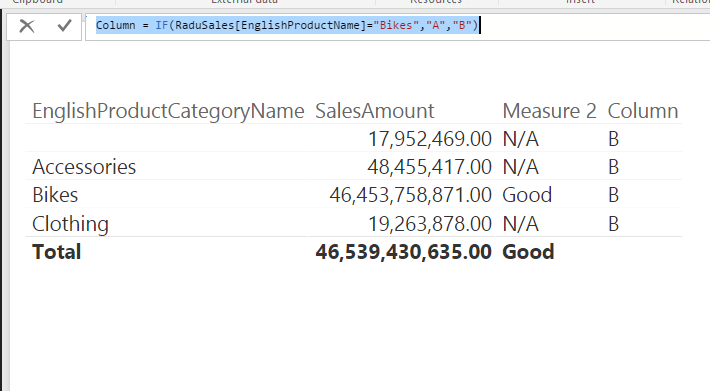
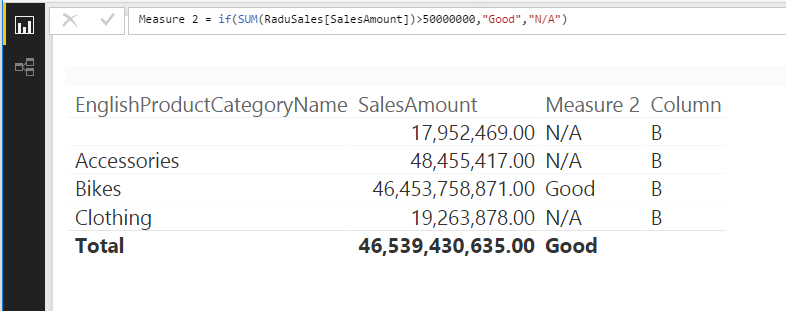
For your Dimensional attrinbute, it's better to create a column other than a measure. I have tested it on my local environment, connect to SAP HANA.

Column = IF(RaduSales[EnglishProductName]="Bikes","A","B")
Measure 2 = if(SUM(RaduSales[SalesAmount])>50000000,"Good","N/A")
Capture.PNGCapture1.PNG


If your issue persists, please provide us more detail information, so that we can make further analysis.


Regards,

Charlie Liao

Thanks Charlie for getting back to me. 


I am trying to create a measure based on a dimensional attribute, so When I create a measure , in If statement under Logical Test, my dimensional attribute column is not getting listed and it does not allow me to select it as well. I have to have an aggregation like Max, MIn, Distinct with the attribute with in the If statement.


I have a table with Attribute column account code, measures Attendance columns, dates etc. I need to create a paid attendance measure based on Account code. If account code is 4000, then sum(Attendance) is the Paid attendance. 


What am I missing ? 


Helpful resources

Announcements
Power BI DataViz World Championships

Power BI Dataviz World Championships

The Power BI Data Visualization World Championships is back! Get ahead of the game and start preparing now!

December 2025 Power BI Update Carousel

Power BI Monthly Update - December 2025

Check out the December 2025 Power BI Holiday Recap!

FabCon Atlanta 2026 carousel

FabCon Atlanta 2026

Join us at FabCon Atlanta, March 16-20, for the ultimate Fabric, Power BI, AI and SQL community-led event. Save $200 with code FABCOMM.

Top Solution Authors