Join us at FabCon Atlanta from March 16 - 20, 2026, for the ultimate Fabric, Power BI, AI and SQL community-led event. Save $200 with code FABCOMM.
Register now!Learn from the best! Meet the four finalists headed to the FINALS of the Power BI Dataviz World Championships! Register now
Hello,
I have a column called Variance. I need a color formatting for this column based on below
-5 to +5 as Green Color
-10 to +10 as Blue Color
-20 to +20 as Red Color.
I only see three options in conditional formatting Min,Max and Diverging.
Any help is appreciated.
Hi @pxg08680,
There are superpositions in your intervals. How to define the color of 0?
Such formatting isn't supported by now. Please vote or create a new idea here: conditional-formatting-intervals. Maybe there is a workaround.
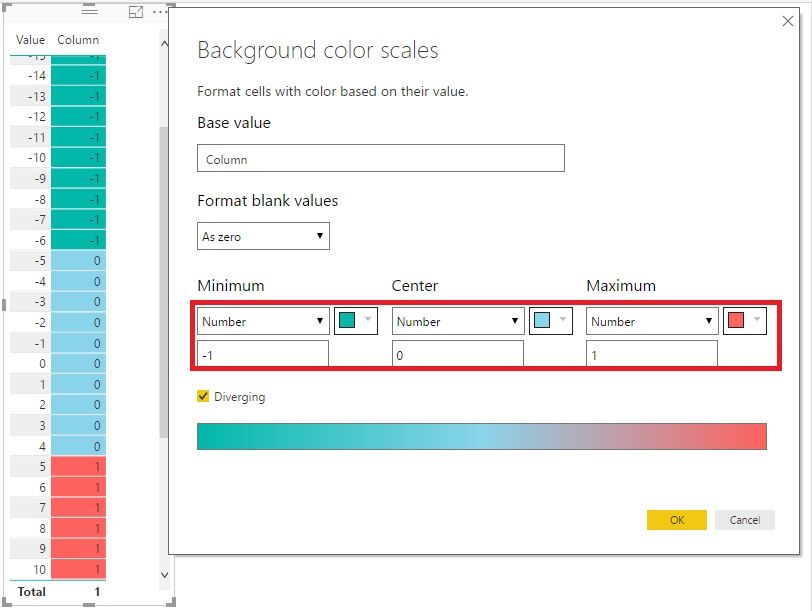
1. Add a new Calculated Column like this:
Column = IF ( [Value] < -5, -1, IF ( [Value] < 5, 0, 1 ) )
2. Format it like this:
Best Regards!
Dale
Share feedback directly with Fabric product managers, participate in targeted research studies and influence the Fabric roadmap.
Check out the February 2026 Power BI update to learn about new features.
| User | Count |
|---|---|
| 53 | |
| 47 | |
| 32 | |
| 16 | |
| 15 |
| User | Count |
|---|---|
| 86 | |
| 71 | |
| 38 | |
| 28 | |
| 25 |