cancel
Showing results for 
Search instead for 
Did you mean: 

Get Fabric certified for FREE! Don't miss your chance! Learn more

Reply
pxg08680
Resolver III
Resolver III

Conditional Color Formatting

Hello,

      I have a column called Variance. I need a color formatting for this column based on below

   -5 to +5 as Green Color

   -10 to +10 as Blue Color

 -20 to +20 as Red Color.


I only see three options in conditional formatting Min,Max and Diverging.


Any help is appreciated.

1 REPLY 1
v-jiascu-msft
Microsoft Employee
Microsoft Employee

Hi @pxg08680,


There are superpositions in your intervals. How to define the color of 0?

Such formatting isn't supported by now. Please vote or create a new idea here: conditional-formatting-intervals. Maybe there is a workaround.

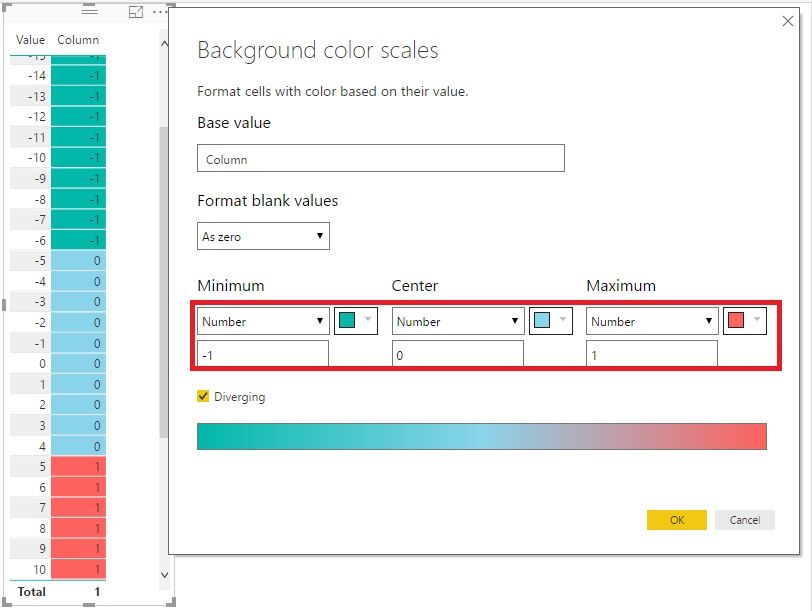
1. Add a new Calculated Column like this:

Column =
IF ( [Value] < -5, -1, IF ( [Value] < 5, 0, 1 ) )

2. Format it like this:


Conditional Color Formatting.jpg


Best Regards!

Dale

Community Support Team _ Dale
If this post helps, then please consider Accept it as the solution to help the other members find it more quickly.

Helpful resources

Announcements
Join our Fabric User Panel

Join our Fabric User Panel

Share feedback directly with Fabric product managers, participate in targeted research studies and influence the Fabric roadmap.

FabCon Atlanta 2026 carousel

FabCon Atlanta 2026

Join us at FabCon Atlanta, March 16-20, for the ultimate Fabric, Power BI, AI and SQL community-led event. Save $200 with code FABCOMM.