cancel
Showing results for 
Search instead for 
Did you mean: 

The Power BI Data Visualization World Championships is back! Get ahead of the game and start preparing now! Learn more

Reply
Anonymous
Not applicable

Conditional Aggregate Measure Help

I'm trying to make a blended cost measure/column/table (not sure what's appropriate here).

The data currently looks like this.

Estimated_Actual        AP_AR       ShipmentID     Cost
Actual                          AP                    1                 5.00
Actual                          AR                    1                 4.00
Estimated                    AP                    1                  4.00
Estimated                    AR                    1                  3.00
Actual                         AP                     2                 -
Actual                         AR                    2                  - 
Estimated                   AP                     2                 7.00
Estimated                   AR                    2                  8.00


I'd like to have a blended cost measure that will display Actual costs if those values exist, otherwise return the Estimated cost. Also needing HASONEVALUE(AP_AR) but that's separate from the issue at hand.

Basically if Estimated_Actual ="Actual" AND has a cost value, use that cost value, otherwise return the estimated cost. Sorry if this is explained poorly, I'm little out of my depth on this request. I was trying to use VAR Summarize to group by estimated/actual, but I'm kind of hitting the wall.

Any help would be appreciated.


1 ACCEPTED SOLUTION
v-juanli-msft
Community Support
Community Support

Hi @Anonymous


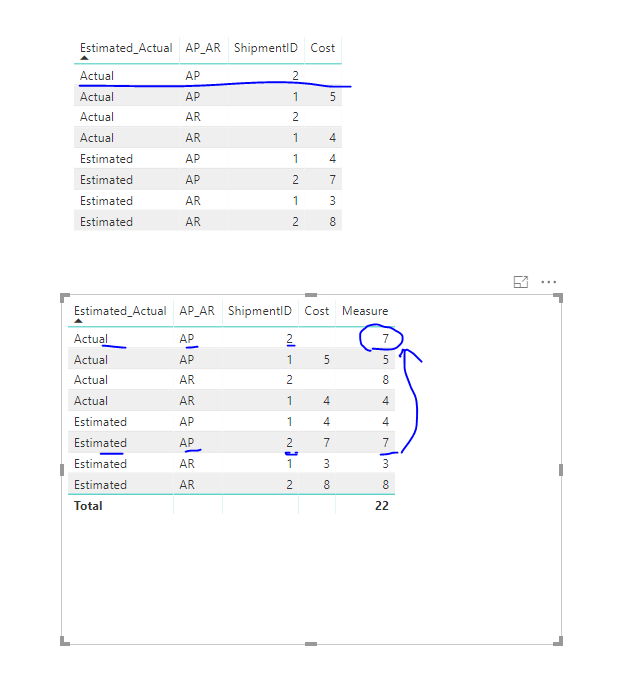
Per your requirements, create measures

Measure =
IF (
    MAX ( Sheet6[Estimated_Actual] ) = "Actual"
        && MAX ( Sheet6[Cost] ) <> BLANK (),
    CALCULATE (
        SUM ( Sheet6[Cost] ),
        FILTER (
            ALLEXCEPT ( Sheet6, Sheet6[ShipmentID], Sheet6[AP_AR] ),
            Sheet6[Estimated_Actual] = "Actual"
        )
    ),
    CALCULATE (
        SUM ( Sheet6[Cost] ),
        FILTER (
            ALLEXCEPT ( Sheet6, Sheet6[ShipmentID], Sheet6[AP_AR] ),
            Sheet6[Estimated_Actual] = "Estimated"
        )
    )
)

8.png


Best Regards

Maggie

View solution in original post

3 REPLIES 3
v-juanli-msft
Community Support
Community Support

Hi @Anonymous


Per your requirements, create measures

Measure =
IF (
    MAX ( Sheet6[Estimated_Actual] ) = "Actual"
        && MAX ( Sheet6[Cost] ) <> BLANK (),
    CALCULATE (
        SUM ( Sheet6[Cost] ),
        FILTER (
            ALLEXCEPT ( Sheet6, Sheet6[ShipmentID], Sheet6[AP_AR] ),
            Sheet6[Estimated_Actual] = "Actual"
        )
    ),
    CALCULATE (
        SUM ( Sheet6[Cost] ),
        FILTER (
            ALLEXCEPT ( Sheet6, Sheet6[ShipmentID], Sheet6[AP_AR] ),
            Sheet6[Estimated_Actual] = "Estimated"
        )
    )
)

8.png


Best Regards

Maggie

Anonymous
Not applicable

Thank you for your help,


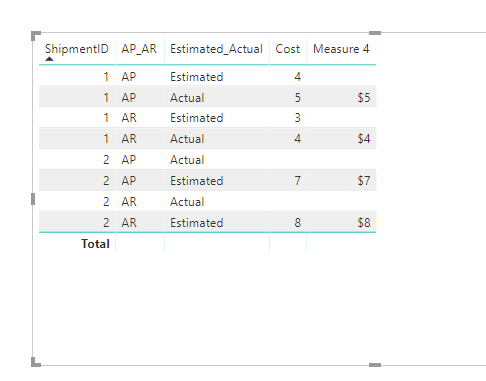
I think I was unclear about what I was looking for in my original post. Here's an example of the expected output for the new measure. The goal is to be able to remove the Estimated_Actual filter/column and not have Cost aggregate values from that filter together.


Hi @Anonymous

Try this measure:

Measure 4 =
VAR flag =
    IF (
        CALCULATE (
            SUM ( Sheet6[Cost] ),
            FILTER (
                ALLEXCEPT ( Sheet6, Sheet6[ShipmentID], Sheet6[AP_AR] ),
                [Estimated_Actual] = "Actual"
            )
        )
            <> BLANK (),
        1,
        0
    )
RETURN
    IF (
        MAX ( [Estimated_Actual] ) = "Actual"
            && flag = 1,
        MAX ( [Cost] ),
        IF ( MAX ( [Estimated_Actual] ) = "Estimated" && flag = 0, MAX ( [Cost] ), " " )
    )

1.png


Best Regards

Maggie

Helpful resources

Announcements
Power BI DataViz World Championships

Power BI Dataviz World Championships

The Power BI Data Visualization World Championships is back! Get ahead of the game and start preparing now!

November Power BI Update Carousel

Power BI Monthly Update - November 2025

Check out the November 2025 Power BI update to learn about new features.

FabCon Atlanta 2026 carousel

FabCon Atlanta 2026

Join us at FabCon Atlanta, March 16-20, for the ultimate Fabric, Power BI, AI and SQL community-led event. Save $200 with code FABCOMM.