This time we’re going bigger than ever. Fabric, Power BI, SQL, AI and more. We're covering it all. You won't want to miss it.
Learn moreDid you hear? There's a new SQL AI Developer certification (DP-800). Start preparing now and be one of the first to get certified. Register now
Hello,
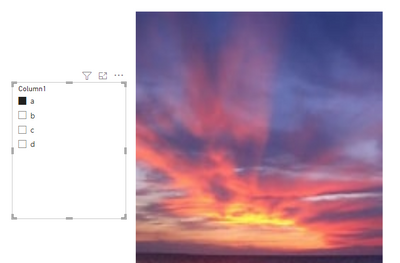
I have a filter and image by cloudscope as shown:
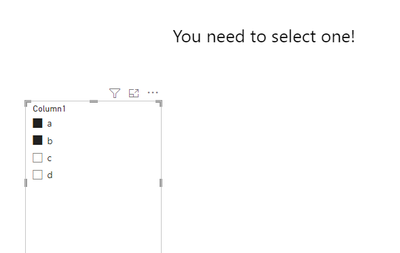
When I don't select anything or more than 1, it shows me by default the first Picture, what I want is to display a message sayin that you can select only one value ?
Is that possible with this visual ?
Thanks
Solved! Go to Solution.
Hi , @Anonymous
Thanks for your quick response! According to your description, you have the [Image Url] columns in your table.
Here are the steps you can refer to :
(1)This is my test data:
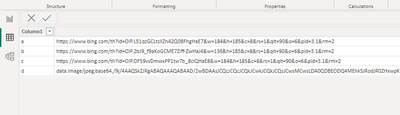
(2)We can create a measure like this:
Measure = var _slicer = VALUES('Table'[Column1])
var _image = MAX('Table'[Image])
return
IF(COUNTROWS(_slicer)=1 , " <html>
<body>
<img src=' "& _image & " ' alt='Girl in a jacket' width='500' height='600'>
</body>
</html> " ,"
<html>
<body>
<h2>You need to select one!</h2>
</body>
</html>")
(3)Then we can also put the measure on the "HTML Content" visual and then we can meet your need :
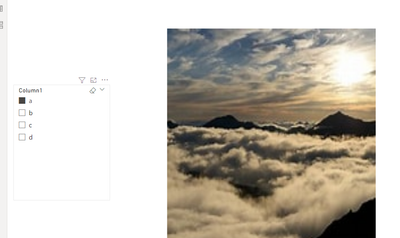
Thank you for your time and sharing, and thank you for your support and understanding of PowerBI!
Best Regards,
Aniya Zhang
If this post helps, then please consider Accept it as the solution to help the other members find it more quickly
Hi , @Anonymous
According to your description, you want to when "select anything or more than 1" show the text "you need to select one" else show an image.
Here are the steps you can refer to :
(1)We can generate a web url for the image:
Measure = var _slicer = VALUES('Table'[Column1])
return
IF(COUNTROWS(_slicer)=1 , " <html>
<body>
<img src='https://www.bing.com/th?id=OIP.W8apTKARTqVhmLzMCisNmAHaEs&w=174&h=185&c=8&rs=1&qlt=90&o=6&pid=3.1&rm=2' alt='Girl in a jacket' width='500' height='600'>
</body>
</html> " ,"
<html>
<body>
<h2>You need to select one!</h2>
</body>
</html>")
(3)Then we need to add a custom visual :
Then we put the measure on this visual and we can meet your need.
Thank you for your time and sharing, and thank you for your support and understanding of PowerBI!
Best Regards,
Aniya Zhang
If this post helps, then please consider Accept it as the solution to help the other members find it more quickly
Hello @v-yueyunzh-msft ,
Thank you for your time 🙂
I think you misunderstand my needs, in fact I have a column with images URLS which are related to product name, so when I select a product his picture shows on, but when I select two products in my slicer it show me the first picture based on the name, what I want is when selecting a product it show me the right picture but when I select more than one product in my slicer it shows me a message with " You can select only one "
Hope I was clear
Thank you again for your time
Hi , @Anonymous
Thanks for your quick response! According to your description, you have the [Image Url] columns in your table.
Here are the steps you can refer to :
(1)This is my test data:
(2)We can create a measure like this:
Measure = var _slicer = VALUES('Table'[Column1])
var _image = MAX('Table'[Image])
return
IF(COUNTROWS(_slicer)=1 , " <html>
<body>
<img src=' "& _image & " ' alt='Girl in a jacket' width='500' height='600'>
</body>
</html> " ,"
<html>
<body>
<h2>You need to select one!</h2>
</body>
</html>")
(3)Then we can also put the measure on the "HTML Content" visual and then we can meet your need :
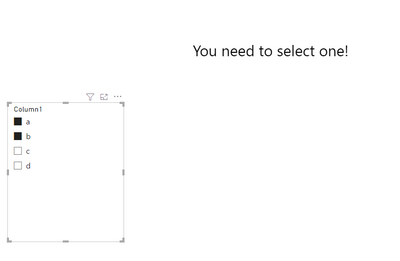
Thank you for your time and sharing, and thank you for your support and understanding of PowerBI!
Best Regards,
Aniya Zhang
If this post helps, then please consider Accept it as the solution to help the other members find it more quickly
Check out the April 2026 Power BI update to learn about new features.
Sign up to receive a private message when registration opens and key events begin.
If you have recently started exploring Fabric, we'd love to hear how it's going. Your feedback can help with product improvements.
| User | Count |
|---|---|
| 34 | |
| 31 | |
| 30 | |
| 21 | |
| 16 |
| User | Count |
|---|---|
| 61 | |
| 50 | |
| 30 | |
| 23 | |
| 23 |