cancel
Showing results for 
Search instead for 
Did you mean: 

July 7 - July 17 | Round 2 of the Power BI Dataviz World Championships. Don't miss your chance! Learn more

Reply
Anonymous
Not applicable

Condition with image by cloudscope

Hello,


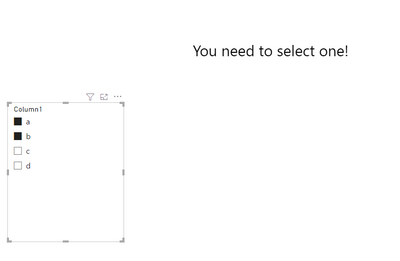
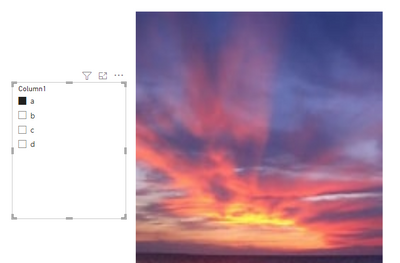
I have a filter and image by cloudscope as shown: 

malekzouaridk_0-1674554920632.png


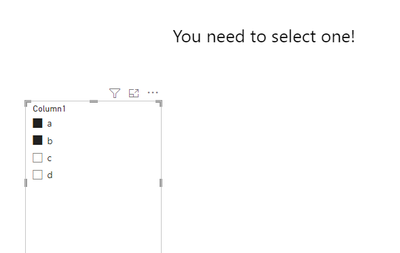
When I don't select anything or more than 1, it shows me by default the first Picture, what I want is to display a message sayin that you can select only one value ?


Is that possible with this visual ?


Thanks

1 ACCEPTED SOLUTION

Hi , @Anonymous 

Thanks for your quick response! According to your description, you have the [Image Url] columns in your table.

Here are the steps you can refer to :
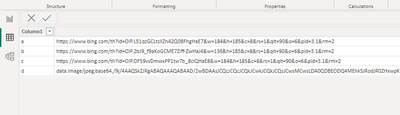
(1)This is my test data:

vyueyunzhmsft_0-1674727263515.png

(2)We can create a measure like this:

Measure = var _slicer = VALUES('Table'[Column1])
var _image =  MAX('Table'[Image])
return
IF(COUNTROWS(_slicer)=1 , " <html>
<body>
<img src='  "& _image & "    ' alt='Girl in a jacket' width='500' height='600'>
</body>
</html> " ,"
<html>
<body>
<h2>You need to select one!</h2>
</body>
</html>")


(3)Then we can also put the measure on the "HTML Content" visual and then we can meet your need :

vyueyunzhmsft_1-1674727308928.pngvyueyunzhmsft_2-1674727315398.png

Thank you for your time and sharing, and thank you for your support and understanding of PowerBI! 


Best Regards,

Aniya Zhang

If this post helps, then please consider Accept it as the solution to help the other members find it more quickly

View solution in original post

3 REPLIES 3
v-yueyunzh-msft
Community Support
Community Support

Hi , @Anonymous 

According to your description, you want to when "select anything or more than 1" show the text "you need to select one" else show an image.

Here are the steps you can refer to :
(1)We can generate a web url for the image:

 
(2)Then we can create a measure :

Measure = var _slicer = VALUES('Table'[Column1])
return
IF(COUNTROWS(_slicer)=1 , " <html>
<body>
<img src='https://www.bing.com/th?id=OIP.W8apTKARTqVhmLzMCisNmAHaEs&w=174&h=185&c=8&rs=1&qlt=90&o=6&pid=3.1&rm...' alt='Girl in a jacket' width='500' height='600'>
</body>
</html> " ,"
<html>
<body>
<h2>You need to select one!</h2>
</body>
</html>")


(3)Then we need to add a custom visual :

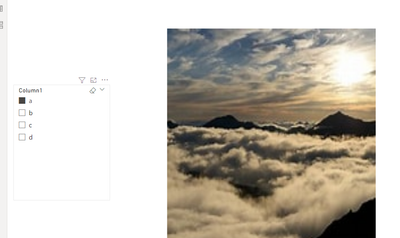
vyueyunzhmsft_0-1674711029073.png

Then we put the measure on this visual and we can meet your need.

vyueyunzhmsft_1-1674711051732.png
vyueyunzhmsft_2-1674711059616.png

Thank you for your time and sharing, and thank you for your support and understanding of PowerBI! 


Best Regards,

Aniya Zhang

If this post helps, then please consider Accept it as the solution to help the other members find it more quickly

Anonymous
Not applicable

Hello @v-yueyunzh-msft ,


Thank you for your time 🙂 

I think you misunderstand my needs, in fact I have a column with images URLS which are related to product name, so when I select a product his picture shows on, but when I select two products in my slicer it show me the first picture based on the name, what I want is when selecting a product it show me the right picture but when I select more than one product in my slicer it shows me a message with " You can select only one "


Hope I was clear


Thank you again for your time

Hi , @Anonymous 

Thanks for your quick response! According to your description, you have the [Image Url] columns in your table.

Here are the steps you can refer to :
(1)This is my test data:

vyueyunzhmsft_0-1674727263515.png

(2)We can create a measure like this:

Measure = var _slicer = VALUES('Table'[Column1])
var _image =  MAX('Table'[Image])
return
IF(COUNTROWS(_slicer)=1 , " <html>
<body>
<img src='  "& _image & "    ' alt='Girl in a jacket' width='500' height='600'>
</body>
</html> " ,"
<html>
<body>
<h2>You need to select one!</h2>
</body>
</html>")


(3)Then we can also put the measure on the "HTML Content" visual and then we can meet your need :

vyueyunzhmsft_1-1674727308928.pngvyueyunzhmsft_2-1674727315398.png

Thank you for your time and sharing, and thank you for your support and understanding of PowerBI! 


Best Regards,

Aniya Zhang

If this post helps, then please consider Accept it as the solution to help the other members find it more quickly

Helpful resources

Announcements
FabCon and SQLCon Barcelona 2026

FabCon & SQLCon – Barcelona 2026

Join us in Barcelona for FabCon and SQLCon, the Fabric, Power BI, SQL, and AI community event. Save €200 with code FABCMTY200.

60 days of Data Days Carousel

Data Days 2026

Join Fabric Data Days 2026: 60 days of free live/on-demand sessions, challenges, study groups, and certification opportunities.

Power BI DataViz World Championships carousel

Power BI DataViz World Championships - June 2026

A new Power BI DataViz World Championship is coming this June! Don't miss out on submitting your entry.