cancel
Showing results for 
Search instead for 
Did you mean: 

We've captured the moments from FabCon & SQLCon that everyone is talking about, and we are bringing them to the community, live and on-demand. Starts on April 14th. Register now

Reply
AMVondra
Regular Visitor

Composite Data Model | Enabling issue

Dear Colleagues.


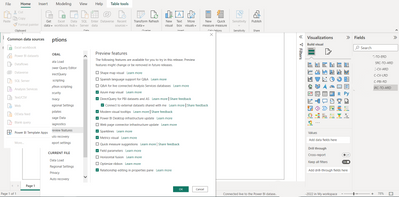
Could You please help me to understand me what I'm doing wrong??? I'd like to try using Composite Data model for my datasets in My Workspace (Power BI Desktop, last update November 2022), but I can't enable it. I've already read many topics but I see practically only one solution is to activate DirectQuery for PBI datasets and AS in Options and that's all 😞 I did it but anyway I can't add another dataset due to not active button only  Power BI Template apps accordingly screenshot. Probably I missed something so I need Your assistence.


AMVondra_0-1669882303297.png

3 REPLIES 3
AMVondra
Regular Visitor

@amitchandak, Thank You very much for Your answer. But I don't see anything You are talking about option to convert the data model. Could You or somebody else give me an advice what should I do for it? 
Thanks in advance.
AMVondra_2-1669937622545.png


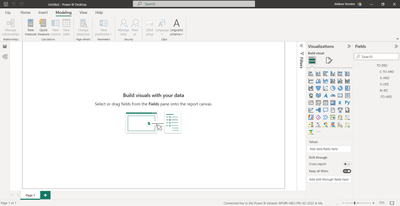
Dear Colleagues. Could You help me with option to convert the data model into a direct query? I don't see this option under Modelling Tab 🙏 Might be I misses something else?

Many Thanks in advance.

amitchandak
Super User
Super User

@AMVondra , Once you check that option, under the modeling tab, you should see an option to convert the data model into a direct query.


Option in preview keeps on changing as some feature will become the main line and you will not have that anymore in the list


https://powerbi.microsoft.com/en-us/blog/directquery-for-power-bi-datasets-and-azure-analysis-servic...

Share with Power BI Enthusiasts: Full Power BI Video (20 Hours) YouTube
Microsoft Fabric Series 60+ Videos YouTube
Microsoft Fabric Hindi End to End YouTube

Helpful resources

Announcements
New to Fabric survey Carousel

New to Fabric Survey

If you have recently started exploring Fabric, we'd love to hear how it's going. Your feedback can help with product improvements.

Power BI DataViz World Championships carousel

Power BI DataViz World Championships - June 2026

A new Power BI DataViz World Championship is coming this June! Don't miss out on submitting your entry.

Join our Fabric User Panel

Join our Fabric User Panel

Share feedback directly with Fabric product managers, participate in targeted research studies and influence the Fabric roadmap.

March Power BI Update Carousel

Power BI Community Update - March 2026

Check out the March 2026 Power BI update to learn about new features.