cancel
Showing results for 
Search instead for 
Did you mean: 

July 7 - July 17 | Round 2 of the Power BI Dataviz World Championships. Don't miss your chance! Learn more

Reply
AMVondra
Regular Visitor

Composite Data Model | Enabling issue

Dear Colleagues.


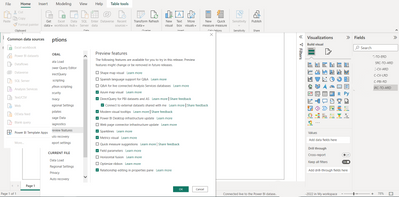
Could You please help me to understand me what I'm doing wrong??? I'd like to try using Composite Data model for my datasets in My Workspace (Power BI Desktop, last update November 2022), but I can't enable it. I've already read many topics but I see practically only one solution is to activate DirectQuery for PBI datasets and AS in Options and that's all 😞 I did it but anyway I can't add another dataset due to not active button only  Power BI Template apps accordingly screenshot. Probably I missed something so I need Your assistence.


AMVondra_0-1669882303297.png

3 REPLIES 3
AMVondra
Regular Visitor

@amitchandak, Thank You very much for Your answer. But I don't see anything You are talking about option to convert the data model. Could You or somebody else give me an advice what should I do for it? 
Thanks in advance.
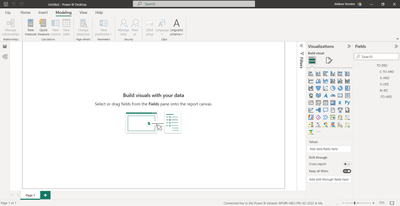
AMVondra_2-1669937622545.png


Dear Colleagues. Could You help me with option to convert the data model into a direct query? I don't see this option under Modelling Tab 🙏 Might be I misses something else?

Many Thanks in advance.

amitchandak
Super User
Super User

@AMVondra , Once you check that option, under the modeling tab, you should see an option to convert the data model into a direct query.


Option in preview keeps on changing as some feature will become the main line and you will not have that anymore in the list


https://powerbi.microsoft.com/en-us/blog/directquery-for-power-bi-datasets-and-azure-analysis-servic...

Share with Power BI Enthusiasts: Full Power BI Video (20 Hours) YouTube
Microsoft Fabric Series 60+ Videos YouTube
Microsoft Fabric Hindi End to End YouTube

Helpful resources

Announcements
FabCon and SQLCon Barcelona 2026

FabCon & SQLCon – Barcelona 2026

Join us in Barcelona for FabCon and SQLCon, the Fabric, Power BI, SQL, and AI community event. Save €200 with code FABCMTY200.

July Power BI Update Carousel

Power BI Monthly Update - July 2026

Check out the July 2026 Power BI update to learn about new features.

60 days of Data Days Carousel

Data Days 2026

Join Data Days 2026: 60 days of free live/on-demand sessions, challenges, study groups, and certification opportunities.

Power BI DataViz World Championships carousel

Power BI DataViz World Championships - June 2026

A new Power BI DataViz World Championship is coming this June! Don't miss out on submitting your entry.

Top Solution Authors