Get Fabric or SQL Certified for Free.
Get certified for free when you join Fabric Data Days 2026 and dive into Fabric, Power BI, SQL, AI, and other essential data skills.
Join now- Power BI forums
- Get Help with Power BI
- Desktop
- Service
- Report Server
- Power Query
- Mobile Apps
- Developer
- DAX Commands and Tips
- Custom Visuals Development Discussion
- Health and Life Sciences
- Power BI Spanish forums
- Translated Spanish Desktop
- Training and Consulting
- Instructor Led Training
- Dashboard in a Day for Women, by Women
- Galleries
- Data Stories Gallery
- Themes Gallery
- Contests Gallery
- QuickViz Gallery
- Quick Measures Gallery
- Visual Calculations Gallery
- Fabric Apps Gallery
- Notebook Gallery
- Translytical Task Flow Gallery
- TMDL Gallery
- R Script Showcase
- Webinars and Video Gallery
- Ideas
- Custom Visuals Ideas (read-only)
- Issues
- Issues
- Events
- Upcoming Events
July 7 - July 17 | Round 2 of the Power BI Dataviz World Championships. Don't miss your chance! Learn more
- Power BI forums
- Forums
- Get Help with Power BI
- Desktop
- Re: Complex filtering problem
- Subscribe to RSS Feed
- Mark Topic as New
- Mark Topic as Read
- Float this Topic for Current User
- Bookmark
- Subscribe
- Printer Friendly Page


- Mark as New
- Bookmark
- Subscribe
- Mute
- Subscribe to RSS Feed
- Permalink
- Report Inappropriate Content
Complex filtering problem
Our data comes from a questionnaire with the columns [Person] (who filled out the questionnaire), [Question], [Answer], and [Year] (when the question was answered. It looks something like this:
Person	Question	Answer	Year
1	Color		red	2017
1	type		apple	2017
1	size		big	2018
1	smell		bad	2018
1	country		denmark	2018
2	color		blue	2017
2	size		big	2017
2	smell		good	2018
2	country		sweden	2018
3	Color		red	2017
3	type		pear	2017
3	size		small	2018
3	smell		bad	2018
3	country		denmark	2017
4	type		blue	2017
4	size		medium	2018
4	smell		bad	2018
I've created a matrix visualisation that shows the number of [Person] who gave what [Answer] to which [Question] in what [Year]. Pretty basic.
Question	Answer	Count of persons
Color
		red	2
		blue	2
Type
		apple	1
		pear	1
size
		big	2
		small	1
		medium	1
smell
		bad	3
		good	1
country
		denmark	2
		sweden	1
But I need to filter those results, either with a slicer or just by clicking a [Answer] in the matrix, and the results would show me "for those people who answered [Answer], what else did they answer to the other questions?"
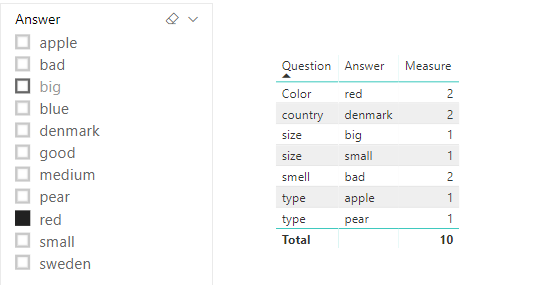
So, using the example table above, if I click on "red", then we'll see that only person 1 and 3 answered "red". The results should then be:
Question	Answer	Count of persons
Color
		red	2
Type
		apple	1
		pear	1
size
		big	1
		small	1
smell
		bad	2
country
		denmark	2
I've tried everything I know how, but unfortunately I only get as far as filtering everything away 😄
I hope someone knows just what I need to do 🙂
Solved! Go to Solution.


- Mark as New
- Bookmark
- Subscribe
- Mute
- Subscribe to RSS Feed
- Permalink
- Report Inappropriate Content
Hi @grggmrtn
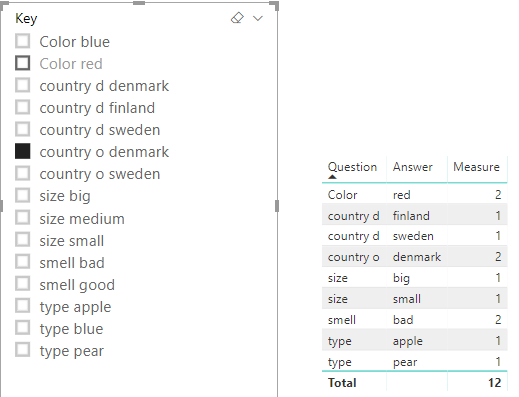
You may add a key column and use it as slicer.Then change the measure as below:
Measure =
VAR a =
    CALCULATETABLE (
        VALUES ( Question[Person] ),
        FILTER ( ALL ( Question ), Question[Key] IN VALUES ( Slicer[Key] ) )
    )
RETURN
    CALCULATE (
        COUNT ( Question[Person] ),
        FILTER ( Question, Question[Person] IN a )
    )
Regards,
If this post helps, then please consider Accept it as the solution to help the other members find it more quickly.
- Mark as New
- Bookmark
- Subscribe
- Mute
- Subscribe to RSS Feed
- Permalink
- Report Inappropriate Content
Hi @grggmrtn
You may create a slicer table and then create a measure like below:
Slicer = DISTINCT(Question[Answer])
Measure =
VAR a =
    CALCULATETABLE (
        VALUES ( Question[Person] ),
        FILTER ( ALL ( Question ), Question[Answer] IN VALUES ( Slicer[Answer] ) )
    )
RETURN
    CALCULATE (
        COUNT ( Question[Person] ),
        FILTER ( Question, Question[Person] IN a )
    )
Regards,
If this post helps, then please consider Accept it as the solution to help the other members find it more quickly.
- Mark as New
- Bookmark
- Subscribe
- Mute
- Subscribe to RSS Feed
- Permalink
- Report Inappropriate Content
Hey, thanks for helping @v-cherch-msft
Your result works fine, but I have a small problem I forgot to mention (SORRY!).
Some of the answers can be found under several different questions - like if I had Country of Origin and Country of Sale as two seperate questions, and "Denmark" could be found under both questions.
Any help there?
- Mark as New
- Bookmark
- Subscribe
- Mute
- Subscribe to RSS Feed
- Permalink
- Report Inappropriate Content
Hi @grggmrtn
I'm afraid i cannot fully understand it.Could you share the example and post some data and expected output here?
Regards,
If this post helps, then please consider Accept it as the solution to help the other members find it more quickly.
- Mark as New
- Bookmark
- Subscribe
- Mute
- Subscribe to RSS Feed
- Permalink
- Report Inappropriate Content
Hi @v-cherch-msft thanks for your patience 🙂
Person	Question	Answer	Year
1	Color		red	2017
1	type		apple	2017
1	size		big	2018
1	smell		bad	2018
1	country	o	denmark	2018
1	country d	sweden	2018
2	color		blue	2017
2	size		big	2017
2	smell		good	2018
2	country	o	sweden	2018
2	sountry d	denmark	2018
3	Color		red	2017
3	type		pear	2017
3	size		small	2018
3	smell		bad	2018
3	country	o	denmark	2017
3	country d	finland	2017
4	type		blue	2017
4	size		medium	2018
4	smell		bad	2018
Clicking on country o "denmark" which is found in person 1 and 3 will produce:
Question	Answer	Count of persons
Color		red	2
type		apple	1
		pear	1
size		big	1
		small	1
smell		bad	2
country d	sweden	1
		finland	1
Notice "denmark" as the answer to "country d" is not counted among the results, since I need to find it as the result to the question "country o"
Does that make more sense?
- Mark as New
- Bookmark
- Subscribe
- Mute
- Subscribe to RSS Feed
- Permalink
- Report Inappropriate Content
Hi @grggmrtn
You may add a key column and use it as slicer.Then change the measure as below:
Measure =
VAR a =
    CALCULATETABLE (
        VALUES ( Question[Person] ),
        FILTER ( ALL ( Question ), Question[Key] IN VALUES ( Slicer[Key] ) )
    )
RETURN
    CALCULATE (
        COUNT ( Question[Person] ),
        FILTER ( Question, Question[Person] IN a )
    )
Regards,
If this post helps, then please consider Accept it as the solution to help the other members find it more quickly.
- Mark as New
- Bookmark
- Subscribe
- Mute
- Subscribe to RSS Feed
- Permalink
- Report Inappropriate Content

Helpful resources

FabCon & SQLCon – Barcelona 2026
Join us in Barcelona for FabCon and SQLCon, the Fabric, Power BI, SQL, and AI community event. Save €200 with code FABCMTY200.

Fabric Community Sticker Challenge - Barcelona 2026
If you love stickers, then you will definitely want to check out our community sticker challenge, Barcelona edition!

Power BI Monthly Update - July 2026
Check out the July 2026 Power BI update to learn about new features.

Power BI DataViz World Championships - June 2026
A new Power BI DataViz World Championship is coming this June! Don't miss out on submitting your entry.

| User | Count |
|---|---|
| 30 | |
| 26 | |
| 23 | |
| 23 | |
| 14 |


| User | Count |
|---|---|
| 46 | |
| 33 | |
| 20 | |
| 18 | |
| 16 |


