Don't miss your chance to take exam DP-600 or DP-700 on us!
Request nowLearn from the best! Meet the four finalists headed to the FINALS of the Power BI Dataviz World Championships! Register now
Hi Everyone,
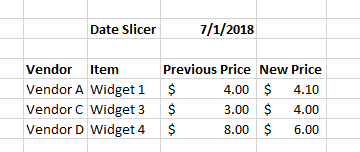
This is probably pretty straight forward but i am banging my head against the desk. I have a list of prices in a table and i want to be able to identify through using a slicer to select a particular date, what were the price changes that occured and what the old and new price is for the impacted widgets. I have mocked up some simple data to help work my problem.
| Vendor | Item | Price | Start Date | End Date |
| Vendor A | Widget 1 | $ 4.00 | 1/1/2018 | 7/1/2018 |
| Vendor A | Widget 1 | $ 4.10 | 7/1/2018 | 9/1/2018 |
| Vendor A | Widget 1 | $ 4.12 | 9/1/2018 | |
| Vendor B | Widget 2 | $ 9.00 | 1/1/2018 | |
| Vendor C | Widget 3 | $ 6.00 | 1/1/2018 | 2/1/2018 |
| Vendor C | Widget 3 | $ 9.00 | 2/1/2018 | 3/1/2018 |
| Vendor C | Widget 3 | $ 1.00 | 3/1/2018 | 4/1/2018 |
| Vendor C | Widget 3 | $ 6.00 | 4/1/2018 | 5/1/2018 |
| Vendor C | Widget 3 | $ 3.00 | 5/1/2018 | 6/1/2018 |
| Vendor C | Widget 3 | $ 3.00 | 6/1/2018 | 7/1/2018 |
| Vendor C | Widget 3 | $ 4.00 | 7/1/2018 | 8/1/2018 |
| Vendor C | Widget 3 | $ 9.00 | 8/1/2018 | 9/1/2018 |
| Vendor C | Widget 3 | $ 3.00 | 9/1/2018 | 10/1/2018 |
| Vendor C | Widget 3 | $ 4.00 | 10/1/2018 | 11/1/2018 |
| Vendor C | Widget 3 | $ 1.00 | 11/1/2018 | 12/1/2018 |
| Vendor C | Widget 3 | $ 5.00 | 12/1/2018 | |
| Vendor D | Widget 4 | $ 8.00 | 1/1/2018 | 7/1/2018 |
| Vendor D | Widget 4 | $ 6.00 | 7/1/2018 | 1/1/2019 |
The solution would be in the image below where I select say "7/1/18" and it lists out the items that had price changes, and what the previous and new price is.
Thank you and let me know if you have any questions.
Solved! Go to Solution.
Try adding this calculated column which returns the previous price and then add the column to your visual:
MAXX(
CALCULATETABLE(
TOPN( 1, Data, Data[Start Date], DESC ),
ALLEXCEPT( Data, Data[Vendor], Data[Item] ),
Data[Start Date] < EARLIER( Data[Start Date] )
),
Data[ Price ]
)
Did I answer your question correctly? Mark my answer as a solution!
Proud to be a Datanaut!
You should use LOOKUPVALUE.
The lookup will be based on Vendor column and if the end date is different from start date then put the price
Try adding this calculated column which returns the previous price and then add the column to your visual:
MAXX(
CALCULATETABLE(
TOPN( 1, Data, Data[Start Date], DESC ),
ALLEXCEPT( Data, Data[Vendor], Data[Item] ),
Data[Start Date] < EARLIER( Data[Start Date] )
),
Data[ Price ]
)
Did I answer your question correctly? Mark my answer as a solution!
Proud to be a Datanaut!
@LivioLanzo - that worked great! Thank you very much and for your quick response!
Share feedback directly with Fabric product managers, participate in targeted research studies and influence the Fabric roadmap.
Check out the February 2026 Power BI update to learn about new features.
| User | Count |
|---|---|
| 53 | |
| 45 | |
| 38 | |
| 16 | |
| 14 |
| User | Count |
|---|---|
| 86 | |
| 70 | |
| 39 | |
| 29 | |
| 28 |