cancel
Showing results for 
Search instead for 
Did you mean: 

Try your skills in the Power BI Dataviz World Championship! Round one ends June 26. Join now

Reply
danb
Resolver I
Resolver I

Comparing Values listed in Table

Hi Everyone, 


This is probably pretty straight forward but i am banging my head against the desk. I have a list of prices in a table and i want to be able to identify through using a slicer to select a particular date, what were the price changes that occured and what the old and new price is for the impacted widgets. I have mocked up some simple data to help work my problem. 


VendorItem Price Start DateEnd Date
Vendor AWidget 1 $       4.001/1/20187/1/2018
Vendor AWidget 1 $       4.107/1/20189/1/2018
Vendor AWidget 1 $       4.129/1/2018 
Vendor BWidget 2 $       9.001/1/2018 
Vendor CWidget 3 $       6.001/1/20182/1/2018
Vendor CWidget 3 $       9.002/1/20183/1/2018
Vendor CWidget 3 $       1.003/1/20184/1/2018
Vendor CWidget 3 $       6.004/1/20185/1/2018
Vendor CWidget 3 $       3.005/1/20186/1/2018
Vendor CWidget 3 $       3.006/1/20187/1/2018
Vendor CWidget 3 $       4.007/1/20188/1/2018
Vendor CWidget 3 $       9.008/1/20189/1/2018
Vendor CWidget 3 $       3.009/1/201810/1/2018
Vendor CWidget 3 $       4.0010/1/201811/1/2018
Vendor CWidget 3 $       1.0011/1/201812/1/2018
Vendor CWidget 3 $       5.0012/1/2018 
Vendor DWidget 4 $       8.001/1/20187/1/2018
Vendor DWidget 4 $       6.007/1/20181/1/2019


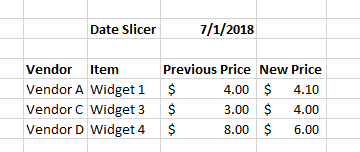
The solution would be in the image below where I select say "7/1/18" and it lists out the items that had price changes, and what the previous and new price is. 


2018-12-03 13_16_12-Book1 - Excel.png


Thank you and let me know if you have any questions. 

1 ACCEPTED SOLUTION
LivioLanzo
Solution Sage
Solution Sage

Try adding this calculated column which returns the previous price and then add the column to your visual:


MAXX(
    CALCULATETABLE(
        TOPN( 1, Data, Data[Start Date], DESC ),
        ALLEXCEPT( Data, Data[Vendor], Data[Item] ),
        Data[Start Date] < EARLIER( Data[Start Date] )
    ),
    Data[ Price ]
)


Did I answer your question correctly? Mark my answer as a solution!


Proud to be a Datanaut!  

View solution in original post

3 REPLIES 3
themistoklis
Community Champion
Community Champion

@danb


You should use LOOKUPVALUE.


The lookup will be based on Vendor column and if the end date is different from start date then put the price

LivioLanzo
Solution Sage
Solution Sage

Try adding this calculated column which returns the previous price and then add the column to your visual:


MAXX(
    CALCULATETABLE(
        TOPN( 1, Data, Data[Start Date], DESC ),
        ALLEXCEPT( Data, Data[Vendor], Data[Item] ),
        Data[Start Date] < EARLIER( Data[Start Date] )
    ),
    Data[ Price ]
)


Did I answer your question correctly? Mark my answer as a solution!


Proud to be a Datanaut!  

@LivioLanzo - that worked great! Thank you very much and for your quick response!

Helpful resources

Announcements
Fabric Data Days is here Carousel

Data Days 2026

Don't miss out on Data Days, June 15 through August 7. Learn Fabric, Power BI, SQL, AI and more.

May Power BI Update Carousel

Power BI Monthly Update - May 2026

Check out the May 2026 Power BI update to learn about new features.

Power BI DataViz World Championships carousel

Power BI DataViz World Championships - June 2026

A new Power BI DataViz World Championship is coming this June! Don't miss out on submitting your entry.