Get certified for free when you join Fabric Data Days 2026 and dive into Fabric, Power BI, SQL, AI, and other essential data skills.
Join nowJuly 7 - July 17 | Round 2 of the Power BI Dataviz World Championships. Don't miss your chance! Learn more
I am looking to have two lines on my line graph, one showing total entries each week over a period of time, the other line would show manufacturers entered over the same period.
My data looks like this:
| Region | Channel | # of Entries Gained | Week Entered | Manufacturer | Month Entered |
| West | Trade | 1 | 1 | Bradford White | June |
| East | Distribution | 1 | 1 | No Purchase | June |
This type of data goes through the month of August currently.
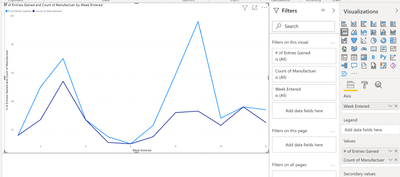
I can graph it to look like this:
This is correct in it shows the total entries in blue and total (cumulative) manufacturer entries in purple.
Ideally I want that purple line to show whichever manufacturer I select, while the blue line remains the same.
I filtered by manufacturer, but it effects both lines in the graph.
Any help is appreciated!
Hi @dmykins
Try to use REMOVEFILTERS or ALL DAX codes to avoid filtering the " # of Entries Gained" by manufacturer.
Something like these:
No. of Entries Gained = calculate (sum(table[# of Entries Gained]),REMOVEFILTER(table[Manufacturer]))
OR
No. of Entries Gained = calculate (sum(table[# of Entries Gained]),ALL('table')
Did I answer your question? Mark my post as a solution!
Appreciate your Kudos !!
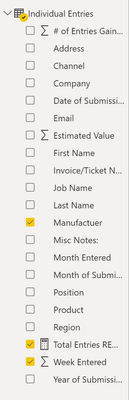
Unfortunately, it has not. I will upload a screenshot of how the data is set up, but I only have the one table, so maybe that is why? I messed around with trying to get REMOVEFILTER to work, but to no avail.
Hi, @dmykins
Can you show the formula you are currently using for the new measure based on the field [#of Entries Gain]?
Best Regards,
Community Support Team _ Eason
Good Morning!
I copied and pasted both of the suggested formulas, and messed around with them a bit, unfortunately, they still filtered so I started to just mess with it on my own and ended up with this:
Try this measure:
No. of Entries Gained = calculate (sum(SUM('Individual Entries'[# of Entries Gained]),REMOVEFILTER('Individual Entries'[Manufacturer]))
Did I answer your question? Mark my post as a solution!
Appreciate your Kudos !!
Join us in Barcelona for FabCon and SQLCon, the Fabric, Power BI, SQL, and AI community event. Save €200 with code FABCMTY200.
Join Fabric Data Days 2026: 60 days of free live/on-demand sessions, challenges, study groups, and certification opportunities.
| User | Count |
|---|---|
| 22 | |
| 22 | |
| 18 | |
| 16 | |
| 13 |
| User | Count |
|---|---|
| 63 | |
| 41 | |
| 40 | |
| 39 | |
| 38 |