Don't miss your chance to take the Fabric Data Engineer (DP-600) exam for FREE! Find out how by watching the DP-600 session on-demand now through April 28th.
Learn moreJoin the FabCon + SQLCon recap series. Up next: Power BI, Real-Time Intelligence, IQ and AI, and Data Factory take center stage. All sessions are available on-demand after the live show. Register now
I am looking to have two lines on my line graph, one showing total entries each week over a period of time, the other line would show manufacturers entered over the same period.
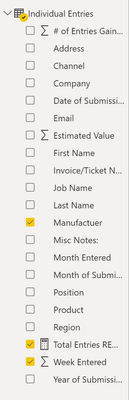
My data looks like this:
| Region | Channel | # of Entries Gained | Week Entered | Manufacturer | Month Entered |
| West | Trade | 1 | 1 | Bradford White | June |
| East | Distribution | 1 | 1 | No Purchase | June |
This type of data goes through the month of August currently.
I can graph it to look like this:
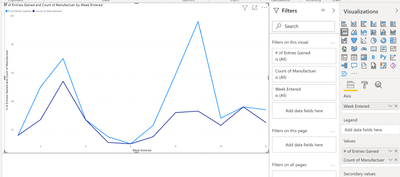
This is correct in it shows the total entries in blue and total (cumulative) manufacturer entries in purple.
Ideally I want that purple line to show whichever manufacturer I select, while the blue line remains the same.
I filtered by manufacturer, but it effects both lines in the graph.
Any help is appreciated!
Hi @dmykins
Try to use REMOVEFILTERS or ALL DAX codes to avoid filtering the " # of Entries Gained" by manufacturer.
Something like these:
No. of Entries Gained = calculate (sum(table[# of Entries Gained]),REMOVEFILTER(table[Manufacturer]))
OR
No. of Entries Gained = calculate (sum(table[# of Entries Gained]),ALL('table')
Did I answer your question? Mark my post as a solution!
Appreciate your Kudos !!
Unfortunately, it has not. I will upload a screenshot of how the data is set up, but I only have the one table, so maybe that is why? I messed around with trying to get REMOVEFILTER to work, but to no avail.
Hi, @dmykins
Can you show the formula you are currently using for the new measure based on the field [#of Entries Gain]?
Best Regards,
Community Support Team _ Eason
Good Morning!
I copied and pasted both of the suggested formulas, and messed around with them a bit, unfortunately, they still filtered so I started to just mess with it on my own and ended up with this:
Try this measure:
No. of Entries Gained = calculate (sum(SUM('Individual Entries'[# of Entries Gained]),REMOVEFILTER('Individual Entries'[Manufacturer]))
Did I answer your question? Mark my post as a solution!
Appreciate your Kudos !!
Check out the April 2026 Power BI update to learn about new features.
If you have recently started exploring Fabric, we'd love to hear how it's going. Your feedback can help with product improvements.
A new Power BI DataViz World Championship is coming this June! Don't miss out on submitting your entry.
| User | Count |
|---|---|
| 45 | |
| 38 | |
| 34 | |
| 21 | |
| 17 |
| User | Count |
|---|---|
| 68 | |
| 64 | |
| 31 | |
| 26 | |
| 26 |