Hi,
I was trying to use formula previously suggested @ https://community.powerbi.com/t5/Desktop/How-to-compare-data-current-vs-previous-in-a-dynamic-table/... but it didn't work as i expected.
I will add a sample of my data;
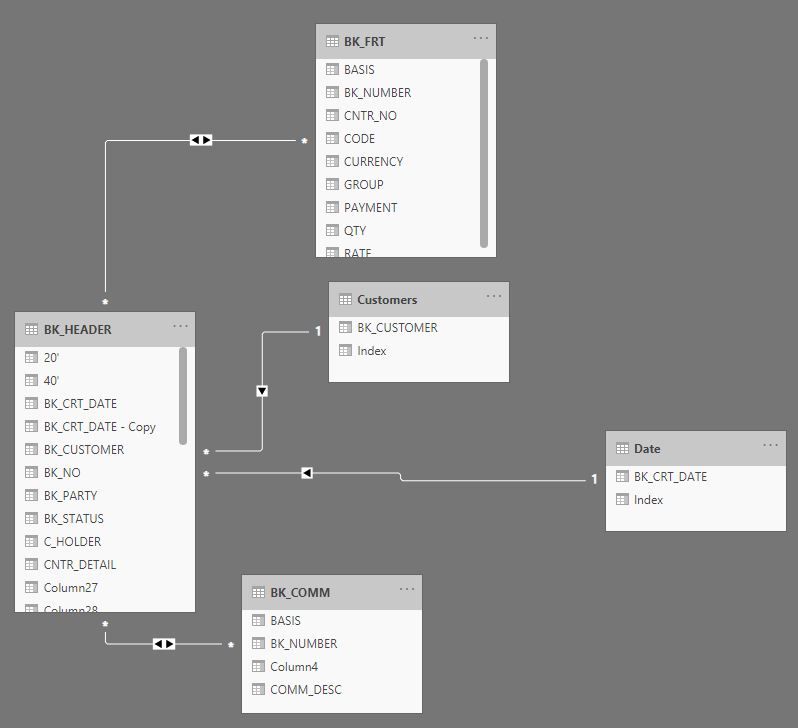
As you can see i have two related tables, unique identifier is "BK_NUMBER" for both. Data is more complicated but i share necessary parts
First i need to calculate sum of "rate" column for each "bk_number",
then two different column to show last "bk_number" total rate and previous "bk_number" total rate.
last & previous comparison should be customer basis (a customer's last order and previous order rates will be shown in different columns)
all bk_numbers are connected to a customer (third sheet is a sample)
| BK_NUMBER | CODE | CURRENCY | RATE |
| 082xxxx5606 | ERC | USD | 75 |
| 082xxxx5606 | CAF | USD | 23.09 |
| 082xxxx5606 | THC | USD | 100 |
| 082xxxx5606 | CSF | USD | 11 |
| 082xxxx5606 | PRM | USD | 18.9 |
| 082xxxx5606 | BRC | USD | 128 |
| 082xxxx5606 | PRS | USD | 75 |
| 082xxxx5606 | ONC | USD | 360 |
| 082xxxx5606 | FRT | USD | 809.01 |
| 082xxxx5607 | ERC | USD | 100 |
| 082xxxx5607 | PRM | USD | 16.83 |
| 082xxxx5607 | CAF | USD | 16.58 |
| 082xxxx5607 | SCS | USD | 25 |
| 082xxxx5607 | FRT | USD | 418.59 |
| 082xxxx5607 | CSF | USD | 11 |
| 082xxxx5607 | BRC | USD | 77 |
| 082xxxx5607 | DMG | USD | 75 |
| 082xxxx5607 | OCC | USD | 75 |
| BK_NO | BK_CRT_DATE |
| 082xxxx5606 | 01-Eyl-20 |
| 082xxxx5606 | 01-Eyl-20 |
| 082xxxx5606 | 01-Eyl-20 |
| 082xxxx5606 | 01-Eyl-20 |
| 082xxxx5606 | 01-Eyl-20 |
| 082xxxx5606 | 01-Eyl-20 |
| 082xxxx5607 | 01-Eyl-20 |
| 082xxxx5607 | 01-Eyl-20 |
| 082xxxx5607 | 01-Eyl-20 |
| 082xxxx5607 | 01-Eyl-20 |
| 082xxxx5607 | 01-Eyl-20 |
| BK_CUSTOMER |
| XYZ LTD |
| ABC LTD |
| ZXC SA |
| ASD LTD |