Don't miss your chance to take the Fabric Data Engineer (DP-600) exam for FREE! Find out how by attending the DP-600 session on April 23rd (pacific time), live or on-demand.
Learn moreJoin the FabCon + SQLCon recap series. Up next: Power BI, Real-Time Intelligence, IQ and AI, and Data Factory take center stage. All sessions are available on-demand after the live show. Register now
Hi,
I was trying to use formula previously suggested @ https://community.powerbi.com/t5/Desktop/How-to-compare-data-current-vs-previous-in-a-dynamic-table/... but it didn't work as i expected.
I will add a sample of my data;
As you can see i have two related tables, unique identifier is "BK_NUMBER" for both. Data is more complicated but i share necessary parts
First i need to calculate sum of "rate" column for each "bk_number",
then two different column to show last "bk_number" total rate and previous "bk_number" total rate.
last & previous comparison should be customer basis (a customer's last order and previous order rates will be shown in different columns)
all bk_numbers are connected to a customer (third sheet is a sample)
| BK_NUMBER | CODE | CURRENCY | RATE |
| 082xxxx5606 | ERC | USD | 75 |
| 082xxxx5606 | CAF | USD | 23.09 |
| 082xxxx5606 | THC | USD | 100 |
| 082xxxx5606 | CSF | USD | 11 |
| 082xxxx5606 | PRM | USD | 18.9 |
| 082xxxx5606 | BRC | USD | 128 |
| 082xxxx5606 | PRS | USD | 75 |
| 082xxxx5606 | ONC | USD | 360 |
| 082xxxx5606 | FRT | USD | 809.01 |
| 082xxxx5607 | ERC | USD | 100 |
| 082xxxx5607 | PRM | USD | 16.83 |
| 082xxxx5607 | CAF | USD | 16.58 |
| 082xxxx5607 | SCS | USD | 25 |
| 082xxxx5607 | FRT | USD | 418.59 |
| 082xxxx5607 | CSF | USD | 11 |
| 082xxxx5607 | BRC | USD | 77 |
| 082xxxx5607 | DMG | USD | 75 |
| 082xxxx5607 | OCC | USD | 75 |
| BK_NO | BK_CRT_DATE |
| 082xxxx5606 | 01-Eyl-20 |
| 082xxxx5606 | 01-Eyl-20 |
| 082xxxx5606 | 01-Eyl-20 |
| 082xxxx5606 | 01-Eyl-20 |
| 082xxxx5606 | 01-Eyl-20 |
| 082xxxx5606 | 01-Eyl-20 |
| 082xxxx5607 | 01-Eyl-20 |
| 082xxxx5607 | 01-Eyl-20 |
| 082xxxx5607 | 01-Eyl-20 |
| 082xxxx5607 | 01-Eyl-20 |
| 082xxxx5607 | 01-Eyl-20 |
| BK_CUSTOMER |
| XYZ LTD |
| ABC LTD |
| ZXC SA |
| ASD LTD |
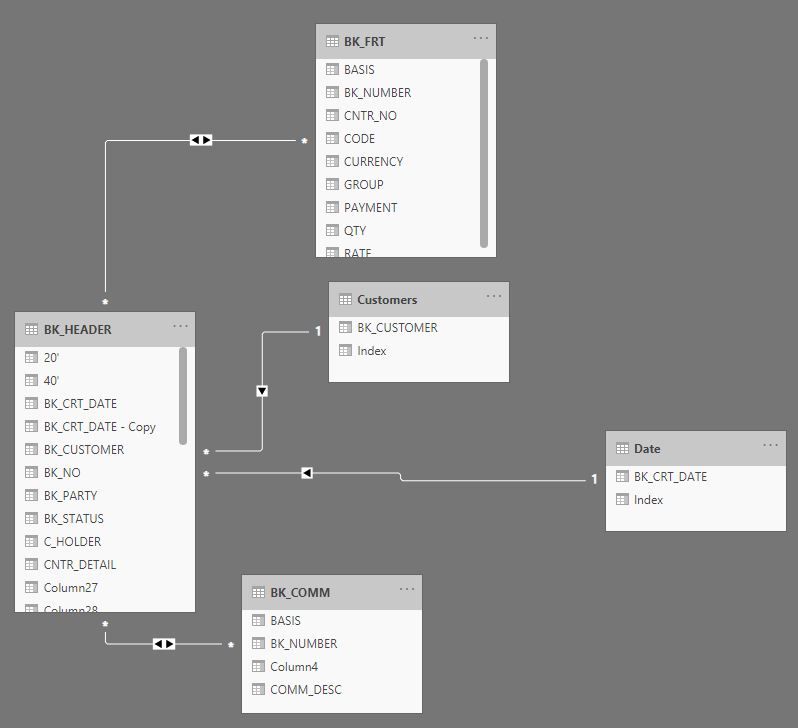
i try this formula but it doesn't work. and i can't even figure out how to find previous order data
Freight Total = SUM(BK_FRT[RATE])
Last Order = Sumx(filter(allselected(BK_HEADER), [BK_CUSTOMER] = max([BK_CUSTOMER]) && [BK_CRT_DATE] = max([BK_CRT_DATE])),[Freight Total])
really need your help @Greg_Deckler @amitchandak @Anonymous
Hi @Anonymous,
If you want to compare current value and previous value, your table requires regular numeric/date value fields then you can use this field as index to looping records and get the corresponding previous values.
If not, you can try to enter to query editor and group with current table category fields and add index inside the groups, then you can get a valid index field for dax format calculations.
Numbering Grouped Data in Power Query
Regards,
Xiaoxin Sheng
Hi @v-shex-msft,
Indexing is done as you suggested. Unique ID for each order. Still i can't create a formula to bring last order & previous order for each customer 😕
HI @Anonymous,
Can you please share a pbix file with some dummy data to test? I test with your sample data but they can't link bk_numbers with customers correctly. BTW, you snapshot also not help to clarify the table relationships.
How to Get Your Question Answered Quickly
Notice: please not attach the sensitive data in the sample file.
Regards,
Xiaoxin Sheng
Check out the April 2026 Power BI update to learn about new features.
If you have recently started exploring Fabric, we'd love to hear how it's going. Your feedback can help with product improvements.
A new Power BI DataViz World Championship is coming this June! Don't miss out on submitting your entry.
| User | Count |
|---|---|
| 48 | |
| 40 | |
| 37 | |
| 20 | |
| 16 |
| User | Count |
|---|---|
| 69 | |
| 67 | |
| 32 | |
| 27 | |
| 26 |