cancel
Showing results for 
Search instead for 
Did you mean: 

A new Data Days event is coming soon! This time we’re going bigger than ever. Fabric, Power BI, SQL, AI and more. Don't miss out.

Reply
Anonymous
Not applicable

Combine Two Columns

Hi community..!!


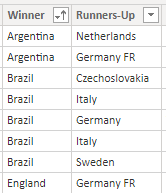
I wanted to append the two columns in one column. Please refer the below image.

ppatil_0-1639738468323.png

I wanted to create new column called as No_of_finals and in that I wanted to append Winner and Runners_up 

Please anyone could you help me to do that..??

waiting for quick respose..

1 ACCEPTED SOLUTION
Samarth_18
Community Champion
Community Champion

HI @Anonymous 

I am not sure if you could create that column in same table. Instead you can try to create seperate table with below code:-

table2 = UNION(VALUES(table[winner]),VALUES(table[runner-up]))


Thanks,

Samarth


Best Regards,
Samarth

If this post helps, please consider accepting it as the solution to help the other members find it more quickly.
Appreciate your Kudos!!
Connect on Linkedin

View solution in original post

5 REPLIES 5
Samarth_18
Community Champion
Community Champion

HI @Anonymous 

I am not sure if you could create that column in same table. Instead you can try to create seperate table with below code:-

table2 = UNION(VALUES(table[winner]),VALUES(table[runner-up]))


Thanks,

Samarth


Best Regards,
Samarth

If this post helps, please consider accepting it as the solution to help the other members find it more quickly.
Appreciate your Kudos!!
Connect on Linkedin

Anonymous
Not applicable

Thanks @Samarth_18 

CNENFRNL
Community Champion
Community Champion

List.Combine(Table.ToColumns(#"Previous Step"))

Thanks to the great efforts by MS engineers to simplify syntax of DAX! Most beginners are SUCCESSFULLY MISLED to think that they could easily master DAX; but it turns out that the intricacy of the most frequently used RANKX() is still way beyond their comprehension!

DAX is simple, but NOT EASY!

Anonymous
Not applicable

Hi @CNENFRNL 

Which is Previous Step you are talking about? I did not get.

I'm not familiar with List.Combine buy you try either of these options

= Table.AddColumn(#"Previous Step", "No_of_finals", each [Winner]&[Runners-Up])

or

= Table.AddColumn(#"Previous Step", "No_of_finals", each Text.Combine({[Winner], [Runners-Up]}, ""), type text)

where #"Previous Step" refers to the name of the last step in your current query


Helpful resources

Announcements
May Power BI Update Carousel

Power BI Monthly Update - May 2026

Check out the May 2026 Power BI update to learn about new features.

Fabric SQL PBI Data Days

Data Days 2026 coming soon!

Sign up to receive a private message when registration opens and key events begin.

New to Fabric survey Carousel

New to Fabric Survey

If you have recently started exploring Fabric, we'd love to hear how it's going. Your feedback can help with product improvements.

Power BI DataViz World Championships carousel

Power BI DataViz World Championships - June 2026

A new Power BI DataViz World Championship is coming this June! Don't miss out on submitting your entry.