This time we’re going bigger than ever. Fabric, Power BI, SQL, AI and more. We're covering it all. You won't want to miss it.
Learn moreDid you hear? There's a new SQL AI Developer certification (DP-800). Start preparing now and be one of the first to get certified. Register now
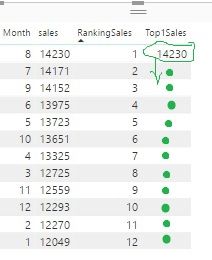
I need a dax function that populates all Rows of column Top1 with the Max Value of sales.
looking at the picture, i want 1423 in all rows.
Solved! Go to Solution.
Hi @Anonymous,
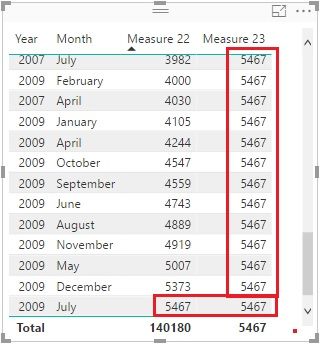
I guess the [sales] is a measure. Maybe you can try it like this:
Measure 23 =
CALCULATE (
MAXX (
SUMMARIZE (
Sales,
Calender[Date].[Year],
Calender[Date].[Month],
"saless", SUM ( Sales[Quantity] )
),
[saless]
),
ALL ( Calender )
)
Best Regards!
Dale
Hi @Anonymous,
I guess the [sales] is a measure. Maybe you can try it like this:
Measure 23 =
CALCULATE (
MAXX (
SUMMARIZE (
Sales,
Calender[Date].[Year],
Calender[Date].[Month],
"saless", SUM ( Sales[Quantity] )
),
[saless]
),
ALL ( Calender )
)
Best Regards!
Dale
Hi,
I have another problem:
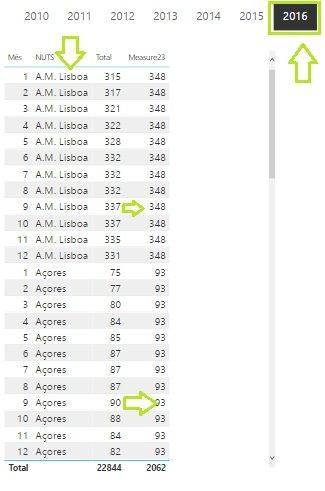
if i add another column "Nuts", Your measure23 don´t work for Nuts Context.
Can you help me
Best regards
Hi @Anonymous,
You can add another ALL() like this:
Measure 23 =
CALCULATE (
MAXX (
SUMMARIZE (
Sales,
Calender[Date].[Year],
Calender[Date].[Month],
"saless", SUM ( Sales[Quantity] )
),
[saless]
),
ALL ( Calender ),
ALL ( 'YourTable'[Nuts] )
)Best Regards!
Dale
Thanks,
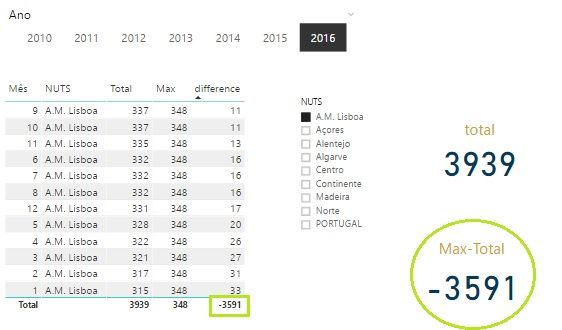
But´s now the problem is that, when i want to calculate the MAX-TOTAL...
Hi @Anonymous
As a calculated column, you can use
Top1=MAX(TableName[Sales])
As a measure, you can use
Top1=Calculate(MAX(TableName[Sales]),All(TableName))
Check out the April 2026 Power BI update to learn about new features.
Sign up to receive a private message when registration opens and key events begin.
If you have recently started exploring Fabric, we'd love to hear how it's going. Your feedback can help with product improvements.
| User | Count |
|---|---|
| 35 | |
| 32 | |
| 25 | |
| 23 | |
| 16 |
| User | Count |
|---|---|
| 65 | |
| 50 | |
| 30 | |
| 24 | |
| 23 |