Learn from the best! Meet the four finalists headed to the FINALS of the Power BI Dataviz World Championships! Register now
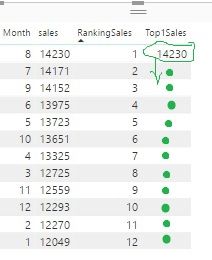
I need a dax function that populates all Rows of column Top1 with the Max Value of sales.
looking at the picture, i want 1423 in all rows.
Solved! Go to Solution.
Hi @Anonymous,
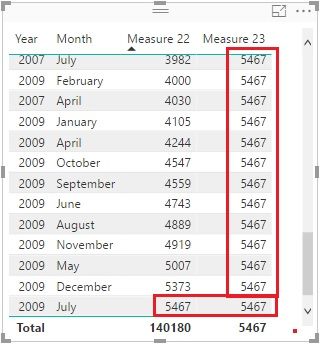
I guess the [sales] is a measure. Maybe you can try it like this:
Measure 23 =
CALCULATE (
MAXX (
SUMMARIZE (
Sales,
Calender[Date].[Year],
Calender[Date].[Month],
"saless", SUM ( Sales[Quantity] )
),
[saless]
),
ALL ( Calender )
)
Best Regards!
Dale
Hi @Anonymous,
I guess the [sales] is a measure. Maybe you can try it like this:
Measure 23 =
CALCULATE (
MAXX (
SUMMARIZE (
Sales,
Calender[Date].[Year],
Calender[Date].[Month],
"saless", SUM ( Sales[Quantity] )
),
[saless]
),
ALL ( Calender )
)
Best Regards!
Dale
Hi,
I have another problem:
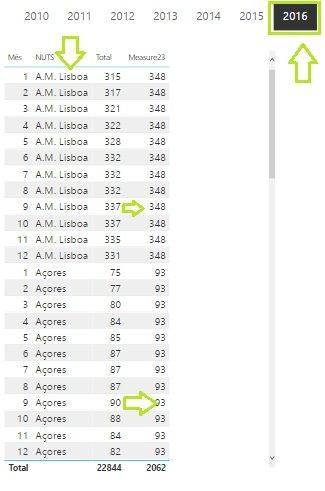
if i add another column "Nuts", Your measure23 don´t work for Nuts Context.
Can you help me
Best regards
Hi @Anonymous,
You can add another ALL() like this:
Measure 23 =
CALCULATE (
MAXX (
SUMMARIZE (
Sales,
Calender[Date].[Year],
Calender[Date].[Month],
"saless", SUM ( Sales[Quantity] )
),
[saless]
),
ALL ( Calender ),
ALL ( 'YourTable'[Nuts] )
)Best Regards!
Dale
Thanks,
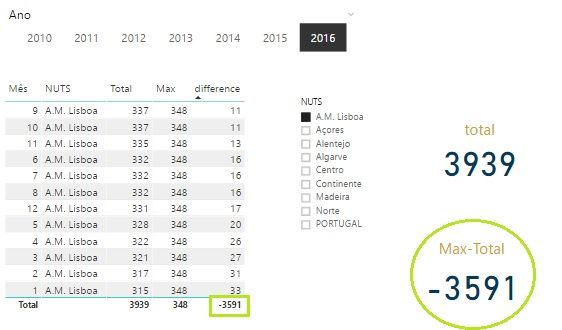
But´s now the problem is that, when i want to calculate the MAX-TOTAL...
Hi @Anonymous
As a calculated column, you can use
Top1=MAX(TableName[Sales])
As a measure, you can use
Top1=Calculate(MAX(TableName[Sales]),All(TableName))
A new Power BI DataViz World Championship is coming this June! Don't miss out on submitting your entry.
Share feedback directly with Fabric product managers, participate in targeted research studies and influence the Fabric roadmap.
| User | Count |
|---|---|
| 48 | |
| 35 | |
| 27 | |
| 15 | |
| 15 |
| User | Count |
|---|---|
| 58 | |
| 56 | |
| 38 | |
| 21 | |
| 21 |