This time we’re going bigger than ever. Fabric, Power BI, SQL, AI and more. We're covering it all. You won't want to miss it.
Learn moreLevel up your Power BI skills this month - build one visual each week and tell better stories with data! Get started
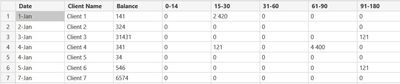
Hi, Need help, I need to get the total revenue for each 0-14 days, 15-30 days etc. and here's my data.
| Date | Client Name | 0-14 | 15-30 | 31-60 | 61-90 | 91-180 | >180 |
| 1-Jan | Client 1 | $0.00 | $2,420.00 | $0.00 | $0.00 | $0.00 | $121.00 |
| 2-Jan | Client 2 | $0.00 | $0.00 | $0.00 | $0.00 | $0.00 | |
| 3-Jan | Client 3 | $0.00 | $0.00 | $0.00 | $0.00 | $121.00 | $0.00 |
| 4-Jan | Client 4 | $0.00 | $121.00 | $0.00 | $4,400.00 | $0.00 | $0.00 |
| 4-Jan | Client 5 | $0.00 | $0.00 | $0.00 | $0.00 | $0.00 | -$121.00 |
| 5-Jan | Client 6 | $0.00 | $0.00 | $0.00 | $0.00 | $121.00 | $0.00 |
| 7-Jan | Client 7 | $0.00 | $0.00 | $0.00 | $0.00 | $0.00 | $88.00 |
My Output is something like this, so that i can create bar graph
| Total | |
| 0-14 | $0.00 |
| 15-30 | $3,530.00 |
| 31-60 | $0.00 |
| 61-90 | $4,400.00 |
| 91-180 | $242.00 |
| >180 | -$9.00 |
I also need to get the details when I click each range of days ( e.g list of client, revenue,date)
P.s I cannot use Pivot as the list will possible contain thousand (which convert to thousand columns)
0-14
Solved! Go to Solution.
@rommel20,
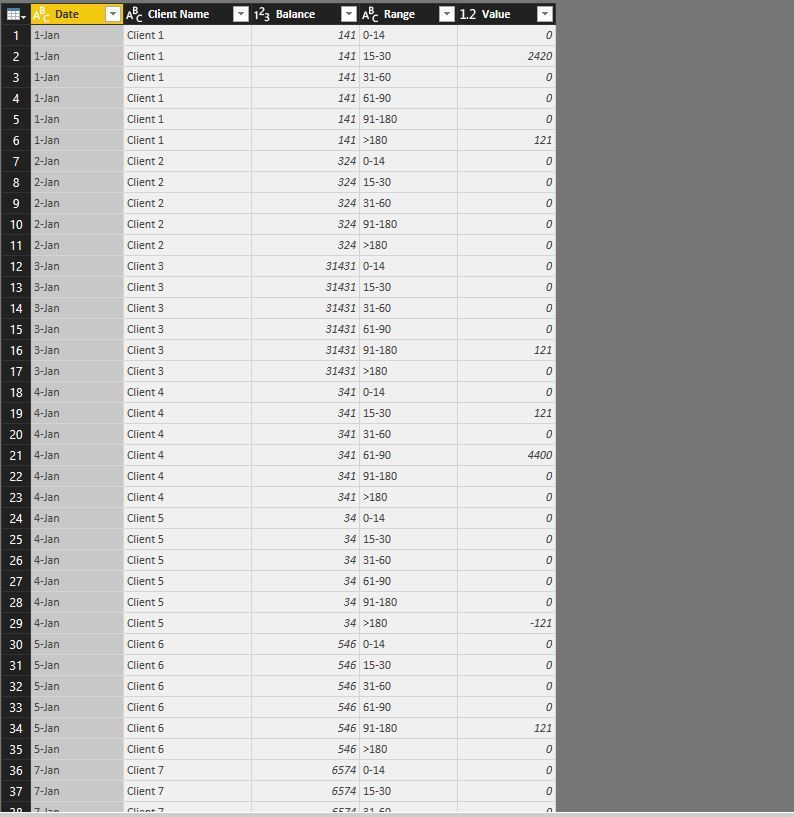
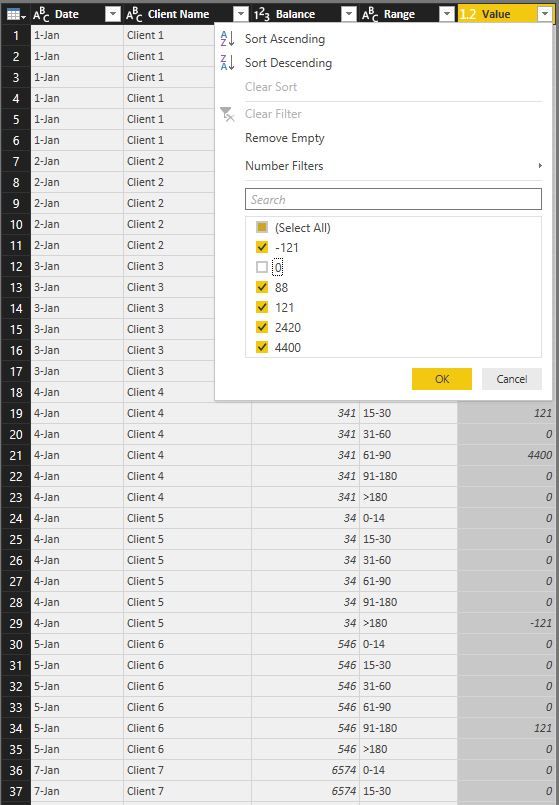
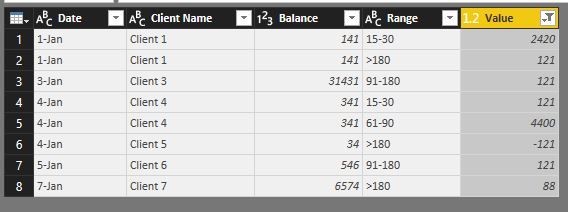
After you unpivot columns in the table, filter out 0 from the Value column. Then when you click 15-30 days in the bar chart, you can show relevant clients and balance in table visual.
Regards,
Lydia
Hello,
Why can't you use Table.Unpivot ?
You will find attached my solution !
Let us know if it answers your questions!
Thanks! I already used Pivot table but my Problem now is I have other column e.g balance
so if I click 15-30 days bar graph it will show 141 + 341 = 482 and also show the list of client.
@rommel20,
After you unpivot columns in the table, filter out 0 from the Value column. Then when you click 15-30 days in the bar chart, you can show relevant clients and balance in table visual.
Regards,
Lydia
Check out the April 2026 Power BI update to learn about new features.
Sign up to receive a private message when registration opens and key events begin.
If you have recently started exploring Fabric, we'd love to hear how it's going. Your feedback can help with product improvements.
| User | Count |
|---|---|
| 30 | |
| 24 | |
| 23 | |
| 17 | |
| 15 |
| User | Count |
|---|---|
| 63 | |
| 36 | |
| 30 | |
| 23 | |
| 22 |