This time we’re going bigger than ever. Fabric, Power BI, SQL, AI and more. We're covering it all. You won't want to miss it.
Learn moreLevel up your Power BI skills this month - build one visual each week and tell better stories with data! Get started
I have attached 2 screen shots 1st and 2nd is from SSRS, which shows our chargeability numbers for Period end date per region with graph grouping:
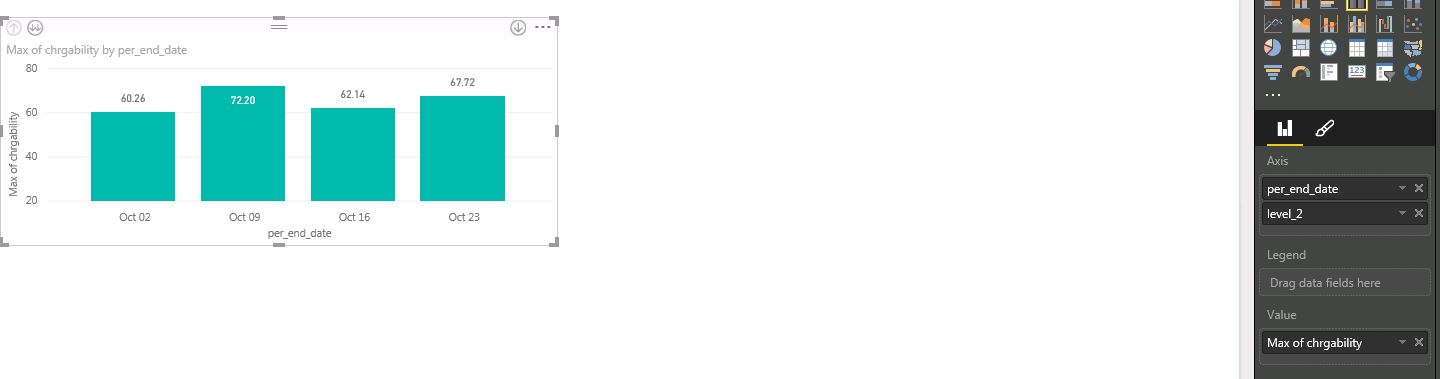
3nd screen shot is from Power BI and I am unable to get similar graph: It is giving me drill down at 2 Axis and not combining it in 1, can i get simliar result in Power BI?
Solved! Go to Solution.
Drag your level_2 field to Legend
Check out the April 2026 Power BI update to learn about new features.
Sign up to receive a private message when registration opens and key events begin.
If you have recently started exploring Fabric, we'd love to hear how it's going. Your feedback can help with product improvements.
| User | Count |
|---|---|
| 36 | |
| 29 | |
| 29 | |
| 21 | |
| 18 |
| User | Count |
|---|---|
| 68 | |
| 45 | |
| 33 | |
| 24 | |
| 23 |